McAfee scams are fraudulent emails, text messages, pop-ups and phone calls that impersonate the well-known McAfee security brand to steal your money or trick you into installing malware. They rank among the most frequently reported billing and tech-support scams in New Zealand, and they work whether or not you have ever owned a McAfee product. This guide explains how each version operates, exactly what to do the moment you are targeted, where to report it in NZ, and how to lower your risk going forward.
Key Points
- What it is: fake emails, texts, pop-ups and calls that impersonate McAfee to take your money or install malware.
- Red flags: an unexpected renewal charge, a phone number to “cancel”, a request to install AnyDesk or TeamViewer, or a demand to “return” an overpayment via gift cards.
- Do not: call the number, install remote-access software, or enter your password on a link from the message.
- Do: close the tab, sign in at mcafee.com yourself to check, and turn on two-factor authentication for your email.
- Report in NZ: NCSC (ncsc.govt.nz, 0800 114 115), Netsafe (report.netsafe.org.nz), NZ Police 105; forward scam texts to 7726.
- If money is involved: contact your bank’s fraud line immediately and call IDCARE on 0800 121 068.
What McAfee scams mean for NZ users
The McAfee name is used as bait precisely because it is a globally recognised security brand. Scammers exploit that familiarity to manufacture urgency: your “subscription has renewed”, your device is “infected”, or a payment has “already been processed”. In New Zealand these messages arrive by email, SMS, browser pop-up and even phone call, and they are rarely random. Lists of addresses and numbers are bought, scraped or harvested from people who have clicked dodgy ads, and NZ mobile numbers are also blanket-dialled.
Scams and fraud are consistently the most-reported category of cyber incident in New Zealand. The National Cyber Security Centre (NCSC) reported that scams caused direct financial losses of more than NZ$25 million in 2024 — roughly a 40% jump on 2023 — and that scam and fraud reports have continued to climb into 2025. New Zealanders are targeted at broadly the same intensity as users in Australia, the UK and the US.
There is a common belief that because New Zealand belongs to the Five Eyes intelligence alliance, its digital environment is somehow better protected against fraud. It is not. Five Eyes is a national-security intelligence-sharing arrangement, not a consumer-fraud shield, and it does nothing to stop a scam email reaching your inbox.
New Zealand’s Privacy Act 2020 gives you rights over how your personal information is collected and used, and a scam that captures your credentials or card details clearly cuts across those protections. But enforcement after the fact is cold comfort when the operator sits offshore. Prevention is the only reliable strategy.
The four main McAfee scam variants
Four versions are in active circulation in 2026. Recognising the pattern is the fastest way to avoid falling for any of them.
The fake renewal invoice
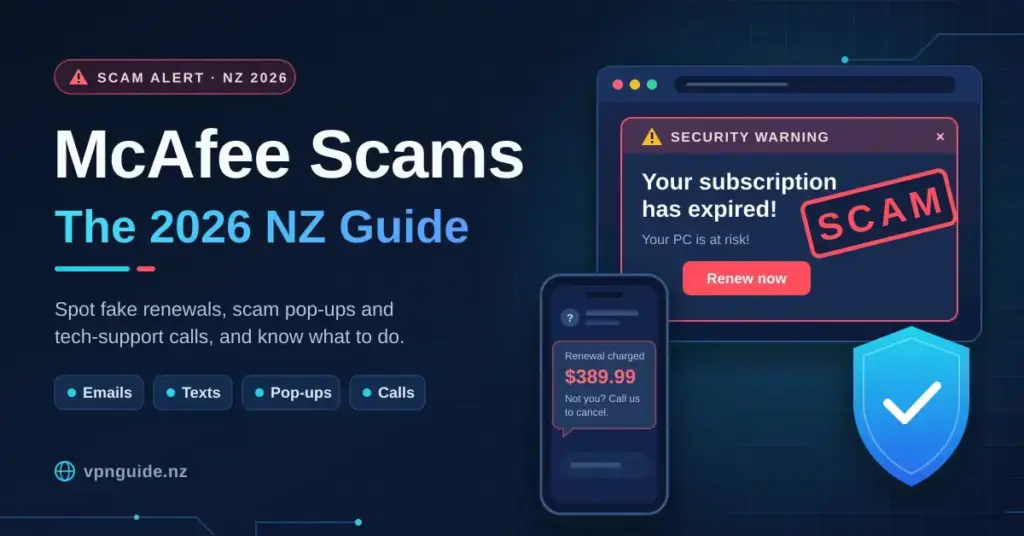
You receive an email — often from a Gmail or Outlook address dressed up to look official — claiming your McAfee subscription has auto-renewed and that a few hundred dollars (commonly quoted around NZ$299–$499) has been charged to your card. The email includes a phone number to “cancel” the charge. When you call, someone posing as McAfee billing support talks you through installing remote-access software (typically AnyDesk or TeamViewer) so they can “process your refund”. Once inside your machine they open your banking app, steal credentials or lock files. The invoice itself is a fabrication — no charge has been made — but the panic it triggers is real. McAfee’s own guidance states it never asks customers to call a phone number contained in an email or text.
The browser pop-up warning
A full-screen browser alert appears, often mimicking a Windows Security or McAfee interface, claiming your device is infected with a trojan or that your licence has lapsed. It may play an audio warning and display a phone number. This is scareware: the page is usually hosted on a compromised or freshly registered domain and uses scripts to make the tab hard to close. No scan has run, and your device is almost certainly fine. The only goal is to get you on the phone.
The phishing email with a malicious link
A more polished variant closely mimics genuine McAfee branding — correct logo, colours, footer disclaimers — with a link to “manage your account” or “download your receipt”. The link leads to a credential-harvesting page that captures your email address and password. If you reuse that password anywhere else, a single capture can compromise your email, banking and social accounts at once.
The refund overpayment scam
This targets people who have already engaged with a scammer once. The caller claims McAfee owes you a refund and asks you to log into your internet banking so they can “transfer” the money. Using the remote access they have already gained, they manipulate what you see on screen to make it look as though a large sum (say NZ$3,000) has been deposited by mistake, then pressure you to return the difference by gift cards or wire transfer. No deposit was ever made — they simply altered the display.
What makes New Zealand users vulnerable
ISP and network context
If you are on a Chorus fibre connection through Spark, One NZ or 2degrees, your ISP does not filter scam domains by default, although some providers offer optional parental-control DNS services (such as Spark’s Family Shield) that block a subset of known malicious domains. These filters are not comprehensive and are no substitute for browser-level protection. Hyperfibre plans at 2Gbps or 4Gbps add no security at all — speed and safety are unrelated.
CERT NZ, which used to coordinate takedowns, has now been folded into the NCSC. The NCSC can still request suspension of NZ-hosted scam domains, but most scam infrastructure is hosted offshore, which limits what domestic action can achieve.
The Five Eyes factor
Some people assume that because NZ is a Five Eyes member, scam calls from overseas are easily traced and prosecuted. In practice the arrangement focuses on national-security intelligence, not consumer fraud. Scam call centres operating from overseas are outside the practical reach of NZ law enforcement unless a formal mutual legal assistance request is made — a slow, resource-heavy process rarely pursued for individual cases below a large financial threshold.
NZ streaming and software subscriptions
Scammers increasingly tailor fake invoices to NZ-specific services. Alongside McAfee you may see bogus renewal notices for Neon, Sky Sport Now or TVNZ+. The technique is identical — a fake charge, a phone number, a remote-access request — so treat any unexpected billing notification with the same suspicion, whatever brand name is on it.
What to do if you are targeted
- Do not call the number. Any phone number in an unsolicited email or pop-up should be treated as hostile. If you genuinely need McAfee, type mcafee.com into your browser yourself and use the contact details there.
- Close the browser tab. If a pop-up has locked your browser, open Task Manager (Ctrl+Alt+Delete on Windows) or force-quit the app (Cmd+Option+Esc on Mac) and end it. Reopen the browser without restoring the previous session to clear the page. You do not need to call anyone.
- Do not install remote-access software. No legitimate company — McAfee, your bank, your ISP or anyone else — will ask you to install AnyDesk, TeamViewer or UltraViewer to process a refund or fix a problem.
- Check your real subscriptions. Sign in at mcafee.com directly to confirm whether you even have an active subscription. Most people who receive these emails have never bought McAfee software.
- Report it. In New Zealand, report scams and cyber incidents to the NCSC at ncsc.govt.nz or on 0800 114 115, and to Netsafe at report.netsafe.org.nz. You can forward scam emails to [email protected] and forward scam texts to the Department of Internal Affairs on 7726. Reporting takes a few minutes and feeds the national picture of scam activity.
- Contact your bank immediately if you gave any financial details or allowed remote access. NZ banks have dedicated fraud teams that can freeze transactions, sometimes reverse recent payments and flag your account.
- Change your passwords from a separate, clean device for any account you touched while a scammer had control — starting with your email and banking logins — and turn on two-factor authentication.
- Get help if you were scammed. Report the crime to NZ Police on 105, and contact IDCARE (0800 121 068) for free help recovering from identity theft or a financial scam.
How to protect yourself
The irony of McAfee scams is that the fix is not necessarily McAfee software — it is a layered approach that targets the actual attack vectors.
DNS-level filtering
Pointing your DNS resolver at a service that blocks known malicious domains is one of the highest-impact, lowest-effort changes you can make. Cloudflare’s malware-blocking resolver (1.1.1.2) and Quad9 (9.9.9.9) both maintain threat feeds that flag scam and phishing domains. They are free, work on any NZ connection and need no software — just a settings change on your device or router. Our guide on how to change DNS on your router walks through it, and on a typical fibre connection the latency impact is negligible.
Browser extensions
uBlock Origin (free, open source) blocks the ad networks and redirect chains that deliver scareware pop-ups, and is available for Chrome, Firefox and Edge. Malwarebytes Browser Guard adds phishing-site detection on top. Neither replaces a full security suite, but together they remove most of the pop-up delivery mechanism.
Email filtering and 2FA
Gmail and Outlook spam filters catch many fake McAfee invoices, but not all — particularly when scammers use freshly registered domains or hijacked legitimate accounts. Turning on two-factor authentication for your email account is essential: even if a phishing page captures your password, 2FA stops the attacker signing in.
A VPN’s role — and its limits
A VPN encrypts your traffic and hides your IP address, which has genuine privacy value. However, a VPN does not filter your inbox, stop you calling a scam number or prevent you installing remote-access software — it is one layer in a stack, not a complete solution. Some providers do add threat-blocking: NordVPN’s Threat Protection Pro, ExpressVPN’s Threat Manager and Mullvad’s DNS blocking all filter known malicious domains, which helps against the redirect and phishing-link variants. If you already use a VPN for privacy, switching those features on is worthwhile. For which providers perform best from NZ connections, see our best VPN guide.
Legitimate antivirus software
If you want a paid suite, options worth considering in 2026 include Bitdefender, ESET and Malwarebytes Premium. Windows Defender, built into Windows 10 and 11, is far more capable than it was five years ago and is a reasonable free baseline. The point is not that McAfee’s own software is bad — it is that the scam misusing its name is entirely separate from any software decision you make.
Comparing protection tools for NZ users
No single tool blocks every variant. The table below shows where each option helps and where it does not.
Comparison
| Tool | Type | Cost (NZD approx.) | Blocks phishing domains | Blocks pop-up scareware | Helps against remote-access scam |
|---|---|---|---|---|---|
| Cloudflare 1.1.1.2 DNS | DNS resolver | Free | Yes (known domains) | Partial | No |
| Quad9 (9.9.9.9) DNS | DNS resolver | Free | Yes (known domains) | Partial | No |
| uBlock Origin | Browser extension | Free | Partial | Yes | No |
| Malwarebytes Premium | Security suite | ~NZ–90/yr | Yes | Yes | Partial (flags RAT installs) |
| Bitdefender Total Security | Security suite | ~NZ0–130/yr | Yes | Yes | Partial |
| VPN with threat protection (NordVPN Threat Protection Pro, ExpressVPN Threat Manager) | VPN + domain filtering | ~NZ0–180/yr | Yes | Partial | No |
| Windows Defender (built-in) | Antivirus | Free | Partial (SmartScreen) | Partial | No |
The remote-access and refund scams in particular rely on social engineering — convincing you to take an action — which no software can fully prevent. Human awareness is the critical last line of defence.
Bottom line
McAfee scams succeed not through technical sophistication but by manufacturing panic. The fake invoice, the scareware pop-up, the phishing link and the refund overpayment all follow one playbook: create urgency, offer a phone number, and use the call to reach your money or your device. The defence is just as simple — never call an unsolicited number, never install remote-access software at a stranger’s request, and verify any billing claim directly through the official website. Layer that with DNS filtering, a reputable ad-blocker and 2FA on your email and banking, and you have covered the vast majority of your risk. If you have already been targeted, report to the NCSC and contact your bank without delay.
Disclaimer
This article is general information about recognising and responding to scams, not legal or financial advice. If you have lost money or shared sensitive details, act quickly and use the official New Zealand resources: report to the National Cyber Security Centre (ncsc.govt.nz, 0800 114 115), report online harm to Netsafe (report.netsafe.org.nz), contact NZ Police on 105, and get free identity and financial-scam support from IDCARE (0800 121 068). Always contact your bank directly using the number on the back of your card.
Reference sources
- National Cyber Security Centre — Report a cyber incident
- NCSC — CERT NZ and NCSC integration now complete
- NCSC — Scams and fraud in the latest quarterly report
- Netsafe — Report online harm and scams
- McAfee — How to identify a fake McAfee email or scam
- Cloudflare — 1.1.1.1 for Families (malware-blocking DNS)
- Quad9 — Free malware-blocking DNS resolver
- NordVPN — Threat Protection Pro malicious website blocker
- ExpressVPN — Threat Manager
- Department of Internal Affairs — How to report scams and spam
Frequently asked questions (FAQ)
I received an email saying McAfee charged me NZ$349 — should I call the number?
No. This is almost certainly a fake-invoice scam. Check your actual bank statement; if no charge appears, delete the email. If a charge does appear, phone your bank using the number on the back of your card, not any number in the email. McAfee does not send unsolicited invoices for subscriptions you never started, and it never asks you to call a number contained in an email or text.
A pop-up says I have a virus and to call McAfee immediately — what do I do?
Close the browser. If the tab will not close, force-quit the browser entirely (Task Manager on Windows, Cmd+Option+Esc on Mac), then reopen it without restoring the previous session. Do not call the number. Run a scan with Windows Defender or Malwarebytes to reassure yourself — the device is almost certainly clean, because the pop-up itself is the scam, not a sign of infection.
I already called the number and gave them remote access — what now?
Disconnect from the internet straight away by unplugging the ethernet cable or turning off Wi-Fi. Phone your bank’s fraud line immediately to review recent transactions and consider freezing the account. Change all passwords from a separate, clean device. Report the incident to the NCSC (ncsc.govt.nz or 0800 114 115) and to NZ Police on 105, and contact IDCARE on 0800 121 068 for recovery help. Have a technician check the device before you reconnect it.
Is McAfee software itself safe to use?
Yes. McAfee is a legitimate security company (its enterprise business became part of Trellix, while the consumer brand continues as McAfee). The scams described here are criminal operations that misuse the McAfee name and have no connection to the company. Whether McAfee’s consumer software is the right choice for you is a separate question about features, price and performance — not safety.
Can a VPN stop me receiving McAfee scam emails?
No. A VPN encrypts your traffic and changes your visible IP address, but it does not filter your inbox. Scam emails are delivered through your email provider’s servers, so the message still arrives. Some VPNs with built-in threat protection will block a phishing website if you click a malicious link, but email-level protection comes from your provider’s spam filters and your own scepticism.
Are these scams more common on certain NZ ISPs?
No. The scams arrive by email and phone, not through ISP infrastructure, so choosing Spark, One NZ, 2degrees or a smaller provider makes no difference to your exposure. The one ISP-level variable is whether your provider offers optional DNS filtering, which blocks some known malicious domains but is not comprehensive. Setting your own resolver (Cloudflare 1.1.1.2 or Quad9) gives more consistent, up-to-date protection whatever your ISP.