Disney+ is sold directly in New Zealand, so you can subscribe and start watching without any workarounds. What has shifted recently is the pricing — an ad-supported tier arrived in April 2026 — and the catalogue, where a Hulu section now sits in place of the old Star hub. This guide breaks down what each plan costs, what you actually get, how to sign up, and how the service stacks up against the other options Kiwis use.
Quick facts
| Provider | The Walt Disney Company (Disney+) |
|---|---|
| Official site | disneyplus.com/en-nz |
| Plans | Standard with Ads, Standard, Premium |
| Cheapest plan | NZ$9.99/month (Standard with Ads) |
| 4K, HDR & Dolby Atmos | Premium only (NZ$25.99/month) |
| Max simultaneous streams | 4 (Premium) |
| Free trial | None currently |
| Availability | Sold directly in New Zealand |
Disney+ prices in New Zealand
| Plan | Monthly | Yearly | Streams | Quality | Downloads |
|---|---|---|---|---|---|
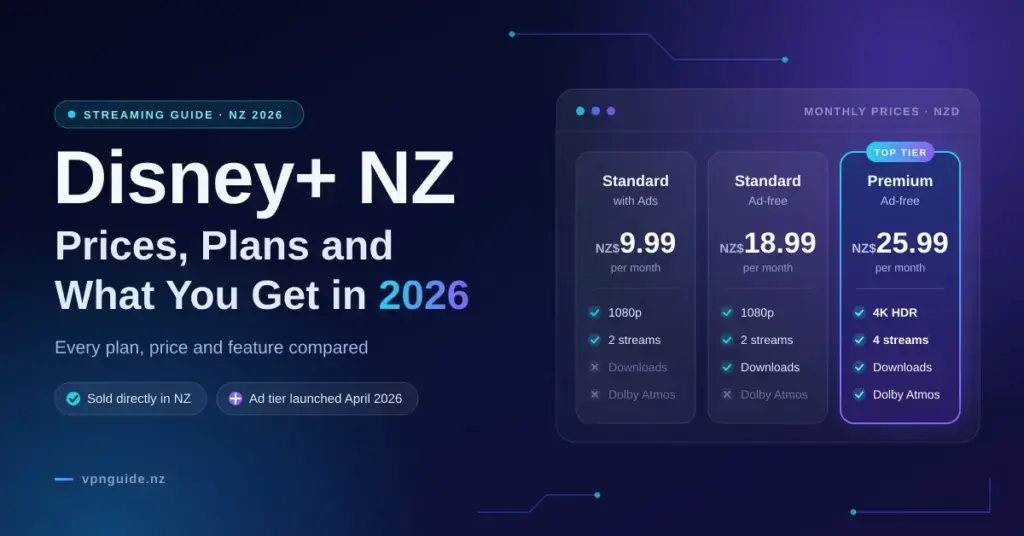
| Standard with Ads | NZ$9.99 | — | 2 | 1080p | No |
| Standard | NZ$18.99 | NZ$189.99 | 2 | 1080p | Yes |
| Premium | NZ$25.99 | NZ$259.99 | 4 | 4K, HDR, Dolby Atmos | Yes |
The yearly options are billed up front but work out cheaper, saving roughly NZ$38 on Standard and NZ$52 on Premium over twelve monthly payments. The cheapest way in is the Standard with Ads tier, which launched across Australia and New Zealand on 21 April 2026, as Variety reported when the ad-supported plan went live in Australia and New Zealand. The trade-offs are ad breaks and no offline downloads — worth knowing if you watch on flights or where mobile coverage is patchy. Prices are set by Disney and change from time to time; the current figures are listed on the official Disney+ New Zealand plans and pricing page.
Which plan suits which household
- Standard with Ads: one or two people who watch at home and do not mind ad breaks.
- Standard: ad-free viewing and downloads for travel, without 4K on the television.
- Premium: a 4K television, a larger household watching on more than two screens, or anyone who wants Dolby Atmos sound.
Disney+ has not offered a standard free trial for years, so the monthly ad-supported plan is the cheapest way to try it. Every plan can be cancelled before the next billing date, which makes rotating it with other services practical.
Key points
- Disney+ is available directly in New Zealand — no VPN or workaround is needed to subscribe.
- Three tiers: Standard with Ads (NZ$9.99), Standard (NZ$18.99) and Premium (NZ$25.99) per month.
- Only Premium streams in 4K with HDR and Dolby Atmos and allows four simultaneous streams.
- The ad tier has no offline downloads; Standard and Premium do.
- Hulu replaced the Star hub in October 2025, adding FX shows and Hulu originals; ESPN is on every plan.
- There is no free trial — the monthly ad plan is the cheapest way to try it, and you can cancel anytime.
What you can watch on Disney+ in New Zealand
The service groups its catalogue into brand sections: Disney, Pixar, Marvel, Star Wars, National Geographic and — since 9 October 2025 in Australia and New Zealand — Hulu, which replaced the Star section internationally. The Hulu section carries the adult drama and comedy that used to sit under Star, including FX series and many Hulu originals. Live sport from ESPN is included on every tier.
Hulu does not operate as a separate service in New Zealand, so Disney+ is where most of its programmes are found; a handful of individual titles are licensed to other local services instead. Each member of the household can keep their own profile and watch list.
Profiles, Kids and parental controls
An account supports several profiles, and a Kids profile shows only age-appropriate titles in a simplified layout. You can set a content rating limit on any profile and add a PIN to lock profiles you do not want children opening, which is useful once the Hulu section brings more mature programming into the same app.
Sharing and the Extra Member add-on
A Disney+ subscription is intended for one household. In several countries Disney now sells an Extra Member add-on for someone outside the home, and whether it appears depends on your plan and country. Check your account settings to see if it is offered on your New Zealand account before sharing a login.
How to sign up for Disney+ in New Zealand
Getting started takes a few minutes:
- Go to the Disney+ website or open the app and choose Sign up.
- Enter an email address and create a password.
- Pick a plan — Standard with Ads, Standard or Premium, monthly or yearly.
- Pay by credit or debit card, or via PayPal; the app stores also let you bill through your Apple or Google account.
- Create your profiles and start watching.
Billing renews automatically until you cancel, and cancelling leaves the account active until the end of the period you have already paid for.
How Disney+ compares
| Service | Cheapest plan | Cheapest ad-free plan |
|---|---|---|
| Disney+ | NZ$9.99 with ads | NZ$18.99 |
| Prime Video | NZ$10.99 with ads | About NZ$3 more |
| Neon | NZ$14.99 with ads | NZ$23.99 |
| HBO Max | NZ$15.99 | NZ$15.99 |
| Netflix | NZ$17.99 | NZ$17.99 |
| Apple TV | NZ$17.99 | NZ$17.99 |
Disney+ with ads is currently the cheapest major streaming subscription in New Zealand. Our best streaming service comparison adds up a full stack across a year, and the HBO Max guide covers the service that took over HBO’s programmes from Neon in June 2026 — its own tiers are set out on the HBO Max New Zealand plans page. Netflix’s current tiers are on the Netflix plans and pricing in New Zealand page. For free local options, our TVNZ+ guide is the place to start.
Watching on your TV and other devices
The Disney+ app runs on most smart TVs sold in New Zealand, on Apple TV, Google TV and Chromecast devices, Fire TV sticks, PlayStation and Xbox consoles, and on phones, tablets and web browsers. For 4K on the Premium plan, Disney recommends about 25 Mbps of steady bandwidth per stream — easy on fibre, but Wi-Fi at the far end of the house is often the weak point. Our internet speed test shows what the lounge is actually getting, and the connection dropouts guide helps if the picture keeps softening.
Common mistakes to avoid
- Choosing Standard with Ads for travel — it has no downloads, so long-haul flights mean no offline viewing.
- Expecting 4K on Standard; only Premium streams in 4K with HDR and Dolby Atmos.
- Testing speed at the router rather than at the TV, which hides the Wi-Fi weak spot that causes buffering.
- Assuming a yearly plan can be refunded mid-term — it is paid up front for the full year.
Using Disney+ overseas and VPNs
Disney+ is available in many countries, but the catalogue differs because of licensing, and the service shows you the library for the country you are in. Using a VPN in New Zealand is legal, but using one to view another country’s Disney+ catalogue breaches Disney’s terms, and streaming services block known VPN addresses, so results are unreliable. Our best VPN guide sets realistic expectations for travel and streaming.
Disclaimer
Prices and plan details are current as at September 2026 and are set by Disney, which changes them from time to time; check disneyplus.com before subscribing. Using a VPN is lawful in New Zealand, but accessing another country’s catalogue may breach the service’s terms of use.
Reference sources
- Disney+ Help Center — Disney+ plans and prices (New Zealand)
- Disney Australia — Ad-supported plan now available in Australia and New Zealand
- Disney Australia — Hulu on Disney+ from 9 October in Australia and New Zealand
- Neon Help Centre — How much does Neon cost?
- Apple (NZ) — Apple TV
- RNZ — HBO Max reveals New Zealand prices
Frequently asked questions
How much is Disney+ in NZ?
NZ$9.99 a month with ads, NZ$18.99 a month (or NZ$189.99 a year) for Standard, and NZ$25.99 a month (or NZ$259.99 a year) for Premium.
Does Disney+ NZ have an ad-supported plan?
Yes. Standard with Ads launched on 21 April 2026 at NZ$9.99 a month. It streams at up to 1080p on two devices and does not include offline downloads.
Is there a Disney+ free trial in New Zealand?
Disney+ does not currently offer a standard free trial. The monthly ad-supported plan is the cheapest way to try it, and it can be cancelled before the next billing date.
Is Hulu included in Disney+ NZ?
Hulu’s programmes appear inside Disney+ under the Hulu section, which replaced Star in Australia and New Zealand on 9 October 2025. There is no separate Hulu subscription here.
Which Disney+ plan has 4K?
Premium, which also adds four simultaneous streams and Dolby Atmos. Standard and Standard with Ads stream at up to 1080p.
Is ESPN on Disney+ in New Zealand?
Yes. Live sport from ESPN is included on all Disney+ plans in New Zealand.