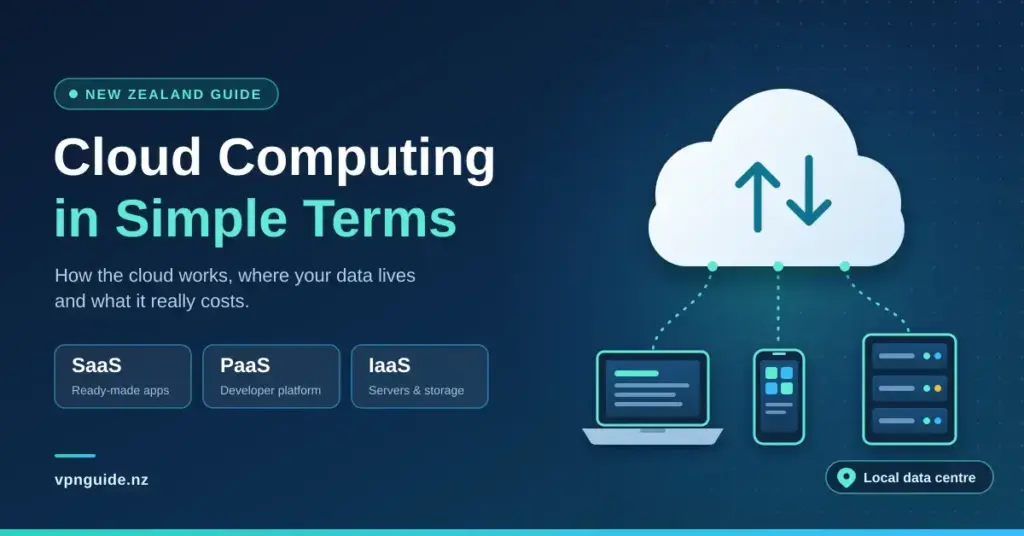
Cloud computing has quietly become the engine behind almost everything we do online, from checking a bank balance in Auckland to backing up holiday photos or running a small business off a laptop in Queenstown. Yet the word “cloud” still makes the whole idea sound mysterious. In plain terms, cloud computing means using someone else’s computers — powerful machines kept in secure data centres — over the internet, instead of buying and maintaining your own hardware. This guide explains how the cloud actually works, the main service models such as SaaS, PaaS and IaaS, where your data lives, what it costs, and how the recent arrival of local data centres is changing the picture for New Zealanders.
Key Points
- What it is: using remote computers over the internet instead of owning and running your own.
- Service models: SaaS (ready-made apps), PaaS (a platform for developers) and IaaS (raw servers and storage).
- Deployment models: public, private, hybrid and community clouds.
- NZ update: Microsoft Azure (Dec 2024) and AWS (Sept 2025) now run Auckland data centres, so data can stay in-country.
- Security is shared: the provider protects the infrastructure; you protect your account with strong passwords and multi-factor authentication.
Understanding cloud computing in plain terms
The simplest way to picture cloud computing is to think of it as a utility, much like electricity or town water. In the past, an organisation that needed serious computing power had to buy physical servers, find a room to put them in, cool them, and pay someone to keep them running. With the cloud, those machines are owned and looked after by a large provider, and you simply “plug in” over the internet and use as much or as little as you need. This shift — from a big up-front purchase (capital expenditure) to a running monthly cost (operational expenditure) — is one of the main reasons the cloud has spread so quickly.
The United States National Institute of Standards and Technology (NIST), whose definition is widely used across the industry, describes cloud computing as on-demand access to a shared pool of configurable computing resources — networks, servers, storage and applications — that can be provisioned and released quickly with little management effort. Stripped of the jargon, that boils down to a handful of everyday traits:
- On-demand and self-service: you switch resources on when you need them, without waiting weeks for hardware to be delivered and installed.
- Pay-as-you-go pricing: most services are billed by subscription or by usage, so you pay for the storage, bandwidth or processing you actually consume.
- Broad network access: you can reach your files and apps from anywhere in New Zealand or overseas, on almost any device with a connection.
- Elasticity: capacity can scale up during a busy period and back down afterwards, so you are not left paying for idle machines.
Whenever you upload a photo to social media, watch a film on demand or check your account online, you are already using the cloud. The data appears to sit on your phone, but it really lives on a distant server and travels back and forth in milliseconds.
| Feature | Local computing | Cloud computing |
|---|---|---|
| Where data lives | A hard drive or server on-site | Remote, managed data centres |
| Maintenance | You look after the hardware | The provider looks after it |
| Scaling up | Buy and install new parts | Adjust settings almost instantly |
| Cost pattern | Large up-front investment | Monthly or usage-based fee |
How your data actually travels
The “cloud” is not a fluffy object floating in the sky — it is a vast collection of high-performance servers housed in guarded data centres around the world. When you open a document or press play, your request travels over the internet to the server that holds the file. The server does the work and sends the result back to your screen, usually in a fraction of a second. That round trip is fast enough to create the illusion that the software is running directly on your laptop. If you would like a deeper technical history, the Wikipedia entry on cloud computing is a reasonable starting point.
The three main cloud service models
Cloud services are usually grouped into three models, often called the “cloud stack” because each one builds on the layer beneath it. Understanding them helps you work out how much control you actually want over the technology.
- Infrastructure as a Service (IaaS): the raw building blocks — virtual servers, storage and networking — that you configure yourself. It is aimed at IT teams who want flexibility without owning physical machines.
- Platform as a Service (PaaS): a ready-made environment where developers can build, test and run applications without managing the underlying servers.
- Software as a Service (SaaS): finished applications you simply log in to through a browser or app. Gmail, Microsoft 365 and Xero are everyday examples, with the provider handling all the maintenance behind the scenes.
Most business software is now delivered this way. Our guide to software solutions for New Zealand businesses looks at the main categories, from accounting to customer management, and how they fit together.
| Service model | Who it is for | Typical use |
|---|---|---|
| SaaS | Everyday users | Email, payroll, document editing |
| PaaS | Developers | Building and hosting a custom app |
| IaaS | IT administrators | Running servers and large databases |
Public, private, hybrid and community clouds
As well as the service models, the cloud is deployed in several different ways depending on how much privacy and control an organisation needs. These are known as deployment models, and NIST recognises four of them.
- Public cloud: shared infrastructure run by a third-party provider such as Amazon, Microsoft or Google. Many customers use the same platform, but each one’s data is kept logically separate. It is cost-effective and highly scalable.
- Private cloud: dedicated to a single organisation, either on-site or in a private data centre. It offers the most control and is often chosen for strict regulatory or security requirements.
- Hybrid cloud: a mix of public and private, letting data and applications move between them. A business might keep sensitive records private while using the public cloud for everyday workloads.
- Community cloud: shared between organisations with similar needs, such as a group of universities or government agencies.
| Cloud type | Level of control | Relative cost |
|---|---|---|
| Public | Lower | Low |
| Private | High | High |
| Hybrid | Moderate | Moderate |
Keeping data in New Zealand: sovereignty and privacy law
Data sovereignty is the principle that information is subject to the laws of the country where it is physically stored. For many New Zealand organisations, keeping sensitive customer data on servers inside the country — or in places with compatible privacy rules — is a key part of their cloud strategy. Anyone handling personal information here also needs to meet the requirements of New Zealand’s Privacy Act, which sets out how data must be collected, stored and shared, including when it is sent overseas.
What sits inside a cloud data centre
A cloud platform is a combination of physical hardware and clever software. At its heart is virtualisation: technology that lets a single physical server be split into several “virtual” machines, each running its own operating system and applications. This is why the cloud is so efficient — expensive hardware rarely sits idle, because many separate workloads can share it safely.
- Virtual machines: software versions of a computer, running on the provider’s hardware.
- Storage clusters: large groups of drives that hold data with built-in redundancy, so a single failure does not lose your files.
- Content delivery networks: systems that copy data to servers closer to the user, cutting loading times.
- Management tools: dashboards that let customers monitor usage and control their resources.
A piece of software called a hypervisor creates and manages the virtual machines, while automation scripts can set up new resources in seconds — a task that once took a technician hours or days.
The major providers and their New Zealand presence
The global cloud market is dominated by three companies. Independent analysts put Amazon Web Services (AWS) at roughly 30 percent of worldwide cloud infrastructure spending in 2025, Microsoft Azure at about 20 percent and Google Cloud at around 13 percent — together well over half the market. Beyond that top tier, providers such as IBM Cloud and Oracle Cloud serve more specialised needs.
What has changed most for New Zealanders is that two of these giants now run data centres on home soil. Microsoft opened its New Zealand North Azure region in Auckland in December 2024, and AWS launched its Asia Pacific (New Zealand) Region — also in Auckland — on 2 September 2025, backed by a stated investment of more than NZ$7.5 billion. Both are built as three separate availability zones for resilience and are powered by renewable electricity. For local businesses that means lower latency and the option to keep data within the country, which matters for the data-sovereignty concerns mentioned above.
Provider Comparison
| Provider | Type | NZ region | Often used for | Official site |
|---|---|---|---|---|
| Amazon Web Services | Public cloud | Auckland (from Sept 2025) | Broadest range of services | aws.amazon.com |
| Microsoft Azure | Public cloud | Auckland (from Dec 2024) | Business and Microsoft 365 users | azure.microsoft.com |
| Google Cloud | Public cloud | Nearest: Sydney/Melbourne | Data analytics and machine learning | cloud.google.com |
| IBM Cloud | Public/hybrid | Nearest: Sydney | Enterprise and regulated workloads | ibm.com/cloud |
| Oracle Cloud | Public cloud | Nearest: Sydney/Melbourne | Databases and business applications | oracle.com/cloud |
Benefits for New Zealand households and businesses
The clearest advantage of the cloud is that it lowers the barrier to using powerful technology. A solo operator in a small town can now access the same world-class software as a large corporation, without a big hardware budget. The benefits stack up across several areas:
- Lower and more predictable costs: you avoid large up-front purchases and pay a manageable running fee instead.
- Disaster recovery: if an office floods or a laptop is stolen, the data still sits safely in the cloud and can be reached from anywhere.
- Remote and hybrid work: teams can collaborate on the same documents in real time, wherever they happen to be.
- Automatic updates: the provider keeps software patched and current, so you always have the latest security fixes.
- Elastic capacity: a retailer can boost its website’s server power for a big sale, then scale straight back down, avoiding crashes without permanent hardware.
Security and privacy in the cloud
Security is usually the first worry people raise about the cloud, and it is a fair question. In practice, the largest providers spend enormous sums on protection — more than almost any small business could — because their reputations depend on it. Data is encrypted both “at rest” (while stored) and “in transit” (while moving across the internet), meaning it is scrambled into code that is useless without the right key. Data centres add physical safeguards such as biometric access controls and round-the-clock monitoring. For most people, a professionally managed cloud account is safer than files kept only on a personal laptop that could be lost. Even so, treating the cloud as one part of your wider cyber security habits is sensible.
The shared responsibility model
One idea trips up many newcomers: in the cloud, security is shared. The provider secures the underlying infrastructure — the servers, storage and data centres — while you remain responsible for your own accounts and data. That means choosing strong, unique passwords, turning on multi-factor authentication and controlling who can access what. Using a good password manager makes this far easier and closes one of the most common gaps attackers exploit.
Everyday examples of cloud computing
Most of us rely on the cloud constantly without noticing. Understanding a few familiar examples makes the concept far less abstract:
- Streaming: when you watch a film or listen to music, you are streaming from the cloud rather than downloading a whole library. Our roundup of streaming services in New Zealand covers the main options.
- Online banking: your financial records are stored and updated in real time on the bank’s secure cloud systems.
- File storage: services such as Dropbox, iCloud and Google Drive sync your files across every device.
- Productivity apps: tools like Google Docs let several people edit the same file at once.
- Gaming: cloud platforms stream high-end games to modest devices by doing the heavy processing on a remote server. Our guide to cloud gaming explains how that works and what you need.
Challenges and common mistakes to avoid
The cloud is not a magic fix, and it pays to go in with your eyes open. A few issues catch people out more than others:
- Internet dependence: if your connection drops, so does access to cloud files and apps. Offline sync features help, but a reliable connection matters.
- Creeping costs: pay-as-you-go bills can climb if usage is not monitored. Setting budget alerts keeps surprises in check.
- Vendor lock-in: moving large volumes of data between providers can be slow and expensive, so it is worth favouring open standards where you can.
- Weak account security: the provider cannot protect you from a reused password. Multi-factor authentication is not optional.
- Skipping the fine print: a Service Level Agreement (SLA) spells out the provider’s uptime promise and what happens if it fails — read it before you commit.
How to get started with the cloud
You do not need to move everything at once. The easiest way in is to pick one clear goal — backing up photos, moving email, or trying a cloud accounting tool — and build from there.
- Assess: identify which files or tasks would benefit most from being in the cloud.
- Trial: most providers offer free tiers or trial periods, so you can test a service before paying.
- Secure it: switch on multi-factor authentication the moment you create an account.
- Review: check your usage regularly so you are not paying for resources you no longer need.
Choosing a provider with a strong local presence or New Zealand partners can also help, since it usually means support during local hours and a better grasp of the rules that apply here. Start small, learn as you go, and the cloud quickly becomes a practical, everyday tool rather than an intimidating buzzword.
Sources
Frequently Asked Questions (FAQ)
What is cloud computing in the simplest possible terms?
Cloud computing means using computing services — storage, software, servers and more — over the internet instead of running them on your own hardware. You access files and apps from any device with a connection, and a provider looks after the machines behind the scenes.
Is my data safe in the cloud?
Generally, yes. Major providers use strong encryption, physical security and constant monitoring that usually exceed what individuals or small businesses can manage alone. That said, security is shared: you still need strong passwords and multi-factor authentication to protect your own account.
Do I always need the internet to use the cloud?
For most tasks, yes, because your data lives on remote servers. Some services offer offline modes that let you keep working and then sync your changes automatically once you are back online.
What is the difference between SaaS, PaaS and IaaS?
They are three levels of the cloud. SaaS gives you finished apps to log in to, PaaS gives developers a platform to build on, and IaaS provides raw servers and storage to configure yourself — ranging from ready-made to fully hands-on.
Are there cloud data centres in New Zealand?
Yes. Microsoft opened its Azure New Zealand North region in Auckland in December 2024, and AWS launched its Asia Pacific (New Zealand) Region in Auckland in September 2025. Both allow eligible data to be stored within the country.
Who are the biggest cloud providers?
The market is led by Amazon Web Services, Microsoft Azure and Google Cloud, which together hold well over half of global cloud spending. Providers such as IBM Cloud and Oracle Cloud serve more specialised requirements.