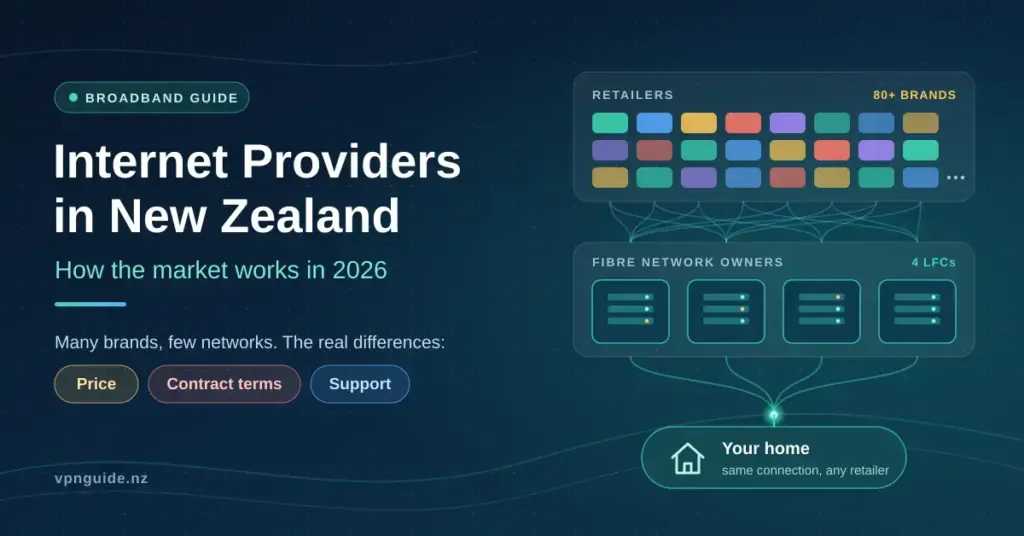
New Zealand has more than eighty broadband brands, but far fewer actual networks. Almost every provider sells access to the same physical infrastructure, which means the differences between them usually come down to price, contract terms and support — not raw speed.
This guide explains how the market is put together, what each technology actually delivers in real homes, what it costs in 2026, and what protections you have when you switch providers or when your old connection is switched off.
The two layers: network owner and retailer
New Zealand separates the company that owns the cables from the company that sends you a bill.
The cable owners are called local fibre companies (LFCs). They build and maintain the network and sell wholesale access to retailers. Chorus is the largest, covering roughly 70% of the national fibre footprint. Three others cover specific regions: Enable in Christchurch, Northpower in Whangārei, and Tuatahi First Fibre across Waikato, Bay of Plenty and Taranaki.
Chorus is barred by law from selling directly to households. That rule exists to keep the network open, so a small retailer can offer the same connection speeds as a large telco.
The company you pay is a retail service provider (RSP) — Spark, One NZ, 2degrees, Mercury, Sky, Voyager and dozens of others. They buy capacity wholesale, add customer service, a router and billing, and resell it.
The practical consequence: if your line goes down, the fault is often with the network owner rather than your retailer, but your retailer is still the one who has to arrange the repair. You never contact Chorus directly.
The technologies available in New Zealand
Fibre (UFB) sends data as pulses of light down glass strands running to your property. It reaches about 87% of New Zealand premises after the government-backed Ultra-Fast Broadband programme finished in December 2022, covering 412 towns and cities. It is the most stable option and has the lowest latency — the short delay before data starts moving, which is what matters most for video calls and online gaming.
Fixed wireless delivers broadband over the mobile network. A modem in your house talks to a nearby cell tower. There is a large gap between the 4G and 5G versions, so lumping them together as one thing is misleading.
WISP wireless works similarly but uses a dedicated local tower and an aerial mounted on your roof, rather than the shared mobile network. It is common in rural areas.
Satellite means Starlink in practice — a dish pointed at low-orbit satellites. It works almost anywhere with a clear view of the sky.
Copper (ADSL and VDSL) is the old telephone-line network. It is being progressively switched off, and is covered in its own section below.
The figures in the table below come from the Commerce Commission’s Measuring Broadband New Zealand programme, which puts test devices in real homes rather than relying on people running one-off tests.
Broadband Technology Comparison
Averages recorded in real New Zealand homes during 2026, from the Commerce Commission’s Measuring Broadband New Zealand Report 28. Peak hours are 7pm–11pm.
| Technology | Download | Peak download | Upload | Latency |
|---|---|---|---|---|
| Fibre Max | 877 Mbps | 872 Mbps | 502 Mbps | 5 ms |
| Fibre 500 | 508 Mbps | 506 Mbps | 109 Mbps | 7 ms |
| Fibre 100 | 106 Mbps | 106 Mbps | 25 Mbps | 6 ms |
| 5G fixed wireless (Spark Max Wireless only) | 412 Mbps | 395 Mbps | 56 Mbps | — |
| Satellite — Starlink Residential Max | 245 Mbps | 224 Mbps | 51 Mbps | 26 ms |
| Satellite — Starlink Residential 100 | 130 Mbps | 115 Mbps | 47 Mbps | 25 ms |
| 4G fixed wireless (all areas, all providers) | 66 Mbps | 52 Mbps | 23 Mbps | 48 ms |
| VDSL (copper) | 63 Mbps | 62 Mbps | 21 Mbps | 20 ms |
| ADSL (copper) | 11 Mbps | 10 Mbps | 1 Mbps | 32 ms |
Latency is the delay before data starts moving — lower is better for video calls and online gaming. Upload matters for sending files, backups and being seen clearly on a call. Fixed wireless and satellite figures apply to the specific providers tested and are not directly comparable between companies.
Those averages are drawn from the Commerce Commission’s Measuring Broadband New Zealand Report 28. If you want to check your own line against them, our guide to running an accurate internet speed test in New Zealand explains how to get a result that actually means something.
Fibre speed tiers explained
Fibre is sold in a small number of wholesale tiers, and every retailer draws from the same list.
Fibre 100 (100/20 Mbps) is the regulated “anchor” product. Providers are required to offer it, which puts a floor under the market. Chorus lifted the entry wholesale plan to this level as part of its 2025 upgrades, as covered by interest.co.nz.
Fibre 500 (500/100 Mbps) is the most popular residential plan. It was a 300/100 Mbps plan until June 2025, when Chorus upgraded roughly 700,000 households at no extra charge. Many retailers still market it as “Fibre 300”, so check the actual speed rather than the plan name.
Fibre Max is built on a gigabit wholesale connection. In testing it averaged 877 Mbps download and 502 Mbps upload. It never reaches a clean 1,000 Mbps because around 6% of the capacity is consumed by protocol overhead — the addressing information wrapped around every packet of data. The realistic ceiling on a speed test is about 940 Mbps.
Hyperfibre offers symmetric 2 Gbps and 4 Gbps plans in Chorus-served areas, with an 8 Gbps tier announced for the future. Symmetric means upload matches download — useful for households that upload large files, back up to the cloud or run home servers. For a closer look at what each tier feels like day to day, see our guide to what Fibre 100, 500, Max and Hyperfibre really deliver.
To put the tiers in everyday terms: every household tested on Fibre 100, Fibre 500 and Fibre Max could run four simultaneous 4K Netflix streams during peak hours. Downloading a large modern game took under 15 minutes on Fibre Max, under 25 minutes on Fibre 500, under two hours on Fibre 100, around three hours on VDSL, and close to five hours on 4G fixed wireless.
Who actually owns which brand
Several brands that appear to compete are owned by the same company and run over the same network. Knowing which is which makes price comparison a great deal clearer.
Who Owns Which NZ Broadband Brand
Several brands that look like rivals share an owner and run over the same network. This list reflects providers included in the Commerce Commission’s Measuring Broadband New Zealand programme; ownership and brand structures change, so check a provider’s own website before signing up.
| Owner / group | Brands | Technologies |
|---|---|---|
| Spark New Zealand | Spark, Skinny, Bigpipe (Skinny and Bigpipe are budget brands on the same network) | Fibre, 4G/5G fixed wireless, copper |
| One New Zealand | One NZ, Farmside (rural focus); One NZ has told some customers it plans to close its HFC cable service | Fibre, 4G/5G fixed wireless, HFC (closing) |
| 2degrees | 2degrees, Orcon, Slingshot (all on the same infrastructure, differing on price and support) | Fibre, Hyperfibre, fixed wireless |
| Energy retailers | Mercury, Contact Energy, Electric Kiwi (fibre sold alongside power, usually discounted for taking both) | Fibre, bundled with electricity |
| Independents and specialists | Sky, Voyager, Inspire Net, Netspeed, PureLink, WorldNet, UniFone, Full Flavour (resell the same wholesale fibre) | Fibre, some Hyperfibre |
| Rural wireless and satellite | Lightwire, Ultimate Broadband, WIZwireless (local-tower wireless); Starlink (low-orbit satellite) | WISP wireless, LEO satellite |
This matters when comparing prices. A budget brand and its premium sibling frequently deliver an identical connection, with the difference showing up in support levels and contract flexibility rather than performance.
What broadband costs in 2026
Indicative monthly pricing, verified in 2026:
| Plan type | Typical monthly price |
|---|---|
| Budget fibre (Skinny, Bigpipe and similar) | $55–$65 |
| Standard fibre 500/100 | $65–$80 |
| Fibre Max (around 900/500) | $85–$115 |
| Rural fixed wireless | $65–$90 |
| Starlink residential | $120–$150, plus hardware |
Prices moved upward through 2026. One NZ raised broadband prices from 22 April, Spark from the end of July, and Skinny by $3 a month from 31 July; Mercury and Orcon also announced increases, as tracked by Broadband Compare. Providers commonly offer retention discounts to customers who ask, so it is worth checking your current bill against the table above.
Always confirm current pricing on the provider’s own website — promotional rates and introductory periods change frequently, and headline prices often exclude connection or hardware costs. Chorus publishes indicative retail pricing and plan benefits that can be useful as a reference point.
The copper switch-off
The old copper phone network is being retired, and this is the change most likely to affect households over the next few years.
Chorus can only stop supplying copper in a Specified Fibre Area — a location the Commerce Commission has formally declared as having fibre available. You can check whether your address falls inside one using the Commission’s map of specified fibre areas. Roughly 1.5 million households and businesses fall inside these areas.
The Copper Withdrawal Code, in force since 2021 and amended in April 2024, sets out what has to happen first:
- Chorus must give at least six months’ written notice, plus two reminders
- Chorus must explain the process and the available replacements
- If you choose fibre, it must be installed before copper is switched off
- Where fibre is not available, copper must continue
Around 200,000 copper lines in fibre areas remain to be transitioned, and Chorus has signalled it intends to stop using copper entirely by 2030. The Commission sets out the full consumer protections for copper withdrawal, and if you believe the code has not been followed, complaints go to Telecommunications Dispute Resolution.
Rural and remote connectivity
Outside the fibre footprint, three options dominate.
4G fixed wireless is widely available but sensitive to congestion. In non-fibre areas it averaged 53 Mbps overall and dropped to 37 Mbps during peak hours, with 41% of peak-hour tests falling below 25 Mbps.
5G fixed wireless is far quicker where it is available — one 5G plan averaged 412 Mbps in testing — but coverage is concentrated in towns and cities, and the connection is still shared with mobile phone traffic. Our guide to 5G home and mobile broadband in New Zealand explains where it fits.
WISP wireless performed comparably to 4G in testing — the one provider measured averaged 63 Mbps — but with a much smaller drop-off at peak times, because the tower is not shared with mobile phone traffic.
Starlink now sells tiered residential plans in New Zealand. Its Residential Max plan averaged 245 Mbps, while the Residential 100 plan averaged 130 Mbps. Both carry higher latency than fibre and are more affected by weather and congestion, though 93% of Residential Max households could still support two simultaneous 4K streams at peak. Our Starlink guide for New Zealand covers hardware, power draw and real-world use in more detail.
Before assuming what you can get, check what is physically available at your address — the technology at your property, not your suburb, is what determines your options.
Switching, contracts and your protections
Switching between fibre providers is usually handled by the incoming retailer and takes a few working days. Your physical connection does not change; the wholesale account simply moves. The NZ Telecommunications Forum sets out the standard process.
Points worth checking before you commit:
- Contract length. Open-term plans cost more upfront but carry no exit fee. Fixed terms often waive installation or hardware costs in exchange for a commitment.
- Introductory pricing. Confirm what the price becomes after the promotional period ends, then calculate the full-year cost.
- Bundles. If your broadband is bundled with power or mobile, moving one service can affect the discount on the other.
- Your phone number. Number portability is regulated, so you can generally keep a landline number when switching. Porting can take up to three days, during which the landline will not work, and it is not guaranteed in every case.
- Emergency calling. Fibre and fixed wireless do not work in a power cut. The 111 Contact Code requires providers to give vulnerable consumers a way to reach emergency services at no cost.
If a dispute cannot be resolved with your provider, Telecommunications Dispute Resolution offers free independent resolution.
One thing no provider controls is what happens to your traffic once it leaves your home. Your retailer can see which sites you connect to, and public Wi-Fi carries its own risks — which is why some households add a VPN alongside their broadband connection. Router placement and hardware also matter more than most people expect; a fast plan behind a poorly positioned modem still feels slow, as our guide to modems and home network hardware explains.
Which option suits which household
Because so many brands share a network, the honest way to choose is by technology and household need rather than by logo.
- Most urban homes: Fibre 500 is the sensible default — it covers heavy streaming, gaming and multiple users comfortably. Fibre 100 is plenty for one or two light users and is cheaper.
- Heavy uploaders and large households: Fibre Max or Hyperfibre make sense if you regularly upload big files, run backups, or have many simultaneous 4K and gaming sessions.
- Rural addresses with a fibre line nearby: take the fibre if it reaches you; nothing else matches it for consistency.
- Rural addresses without fibre: a local WISP or 5G fixed wireless is usually the best value where coverage is good; Starlink is the fallback when neither reaches you.
- Cost-sensitive users: a budget sibling brand on the same network (for example Skinny or Bigpipe) delivers the same line as its premium parent, trading some support for a lower bill.
If you are unsure how much speed you actually need, our companion guide on choosing the right speed for your household works through it with real usage examples.
Disclaimer: This article is provided for general information only. It describes how the New Zealand broadband market is structured and reports independently published performance data. It is not advice, a recommendation, or an endorsement of any provider, plan or product, and nothing here is an encouragement to purchase. Speeds, prices and plan availability change frequently and vary by address — verify current details with the provider directly before making any decision. For independent performance data see the Commerce Commission’s Measuring Broadband New Zealand programme; for complaints about a telecommunications provider, contact Telecommunications Dispute Resolution; for general consumer rights, see Consumer Protection at consumerprotection.govt.nz.
Sources
- Commerce Commission — Measuring Broadband New Zealand Report 28, July 2026
- Commerce Commission — Measuring Broadband New Zealand dashboard
- Commerce Commission — Consumer protections for copper withdrawal
- Commerce Commission — Map of specified fibre areas
- Commerce Commission — Amendments to the Copper Withdrawal Code
- Commerce Commission — Local and mobile number portability
- NZ Telecommunications Forum — Switching broadband and landline providers
- Telecommunications Dispute Resolution — Copper Withdrawal Code
- Chorus — Fibre plan speed increases for over 700,000 homes
- Chorus — Fibre benefits and indicative retail pricing
- interest.co.nz — Chorus wholesale plan speed upgrades and the regulated anchor product
- Broadband Compare — Broadband price increases across New Zealand in 2026
- Spark New Zealand — Spark Sport closure notice
- Wikipedia — Chorus Limited and the Ultra-Fast Broadband programme
Frequently Asked Questions
Why do all providers offer the same speeds?
Because they are reselling the same wholesale connection. Chorus and the other local fibre companies set the speed tiers, and retailers buy from that list. A budget brand and a premium brand on the same tier deliver the same line.
Is Fibre 300 still 300 Mbps?
No. Chorus upgraded that tier to 500/100 Mbps in June 2025 at no extra cost, but many retailers kept the old plan name. Check the advertised speed rather than the label.
Will my copper line be switched off?
Only if you are in a Specified Fibre Area, meaning fibre is available where you live. If so, Chorus must give you at least six months’ notice plus two reminders, and must install your replacement fibre connection before disconnecting copper. Outside those areas, copper continues.
Is 5G fixed wireless as fast as fibre?
It can be quick — one 5G plan averaged 412 Mbps in testing — but it is shared with mobile traffic, so speeds vary by time of day and distance from the tower. Fibre remains more consistent and has lower latency.
Do I lose my landline number if I switch providers?
Usually not. Number portability is regulated, so you can generally take your number with you. Porting can take up to three days, your landline will not work during that window, and in some cases keeping the number is not possible — confirm with the new provider first.
How much speed does a household actually need?
Every household tested on Fibre 100 or above could run four simultaneous 4K streams at peak times. Higher tiers mainly help with large uploads, big game downloads and homes with many heavy simultaneous users.