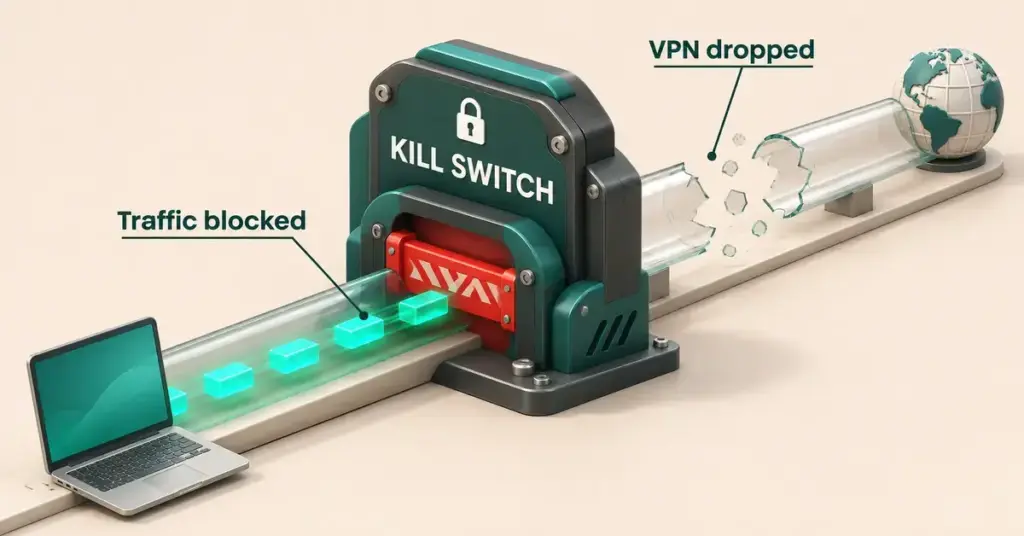
A VPN kill switch is a safety setting that cuts your device’s internet the instant your VPN connection drops, so your real IP address and unencrypted traffic never leak out while you still think you are protected. If you use a VPN for privacy, for streaming, or on public Wi-Fi, it is one of the few settings genuinely worth turning on. This guide explains what a kill switch does, the different types, how it behaves on Windows, Android, macOS and iPhone, and whether a New Zealand household actually needs one.
What a VPN kill switch actually is
A VPN (virtual private network) routes your internet traffic through an encrypted tunnel to a remote server. That tunnel hides your real IP address — the number that identifies your connection — from the websites and apps you use and from your internet provider. The catch is that a tunnel can quietly fail: the server glitches, your Wi-Fi drops for a second, or your laptop wakes from sleep before the VPN reconnects.
A kill switch is a watchdog that sits alongside the tunnel. The moment the encrypted connection is no longer there, it blocks your traffic instead of letting your device fall back to the ordinary, unprotected connection. Without one, a brief drop can expose your real IP address and anything you are doing to your provider — usually without any warning on screen.
How a VPN kill switch works
Under the bonnet, every kill switch follows the same three steps:
- It watches the tunnel. The VPN app constantly checks whether the encrypted connection to the server is alive.
- It blocks traffic on a drop. If the tunnel fails — a weak signal, a server problem, or switching to a different VPN server — the kill switch immediately stops data leaving or entering your device.
- It restores access on reconnect. Once the VPN re-establishes a secure tunnel, normal internet use resumes automatically. On most apps you do nothing; the gap simply closes.
The practical effect is that you might see a few seconds of “no internet” rather than a silent leak. That trade — a brief interruption in exchange for never being exposed — is the whole point.
Why VPN connections drop in the first place
A kill switch only matters because tunnels really do drop, and in New Zealand there are plenty of everyday reasons. Fixed wireless connections on 4G or 5G can wobble as the signal shifts; home Wi-Fi can hiccup when a device roams between rooms; a fibre line can glitch for a moment; and switching VPN servers briefly breaks the tunnel on purpose. Many of the same gremlins that cause your internet to keep cutting out will also knock a VPN offline for a second or two — long enough to leak if nothing is guarding the gap.
The main types of kill switch
Not all kill switches behave the same way. There are three common styles, and the labels differ slightly between apps.
- System-level (sometimes called an “internet kill switch”). This blocks all internet on the whole device whenever the tunnel is down. Nothing gets online until the VPN reconnects. It is the safest option because it leaves no app behind, but it is also the most disruptive.
- App-level. Instead of the whole device, this closes only the apps you nominate — say a torrent client or a particular browser — and leaves the rest of your internet working. It is handy if only one or two apps really need protecting, but any app you did not add can still leak.
- Permanent (also called an “always-on” kill switch). The strictest setting. It blocks all traffic at all times unless you are connected to a VPN server, including when you manually turn the VPN off and even right after the device restarts. Your device simply cannot reach the internet outside the tunnel.
The table below compares the three at a glance.
Kill switch types compared
| Type | What it blocks | Survives a manual disconnect or reboot? | Best for | Example apps |
|---|---|---|---|---|
| System-level (internet kill switch) | All internet on the whole device while the tunnel is down | No — it turns off when you switch the VPN off | Anyone wanting whole-device protection | NordVPN “Internet Kill Switch”, Surfshark |
| App-level | Only the apps you choose (e.g. a torrent client or browser) | No | People who only need one or two apps protected | NordVPN “App Kill Switch” (Windows/macOS) |
| Permanent / always-on | All traffic at all times unless you are on a VPN server | Yes — it stays on after a manual disconnect and after a restart | Maximum privacy; a device that must never go online unprotected | Proton VPN (Windows/Linux), Android “Block connections without VPN” |
Kill switches on each platform
Which type you get depends on your device as much as your provider. Here is how the mainstream apps behave, based on their own documentation.
- Windows. The most flexible. NordVPN’s Windows app, for example, lets you choose between a system-wide “Internet Kill Switch” and an “App Kill Switch” that closes only chosen programs. Proton VPN’s permanent kill switch is also offered on Windows.
- macOS and Linux. Desktop apps generally offer a kill switch too. Proton VPN extends its permanent kill switch to Linux, and most providers include at least a standard version on Mac.
- Android. On Android 8.0 and newer, the phone itself has a built-in option. In your VPN’s settings you enable “Always-on VPN” and then “Block connections without VPN”, which acts as a system-wide kill switch independent of the app. Google’s own help pages explain where to find these toggles.
- iPhone and iPad. Apple does not give VPN apps a simple kill-switch toggle, so providers keep your traffic inside the tunnel at the routing level instead. NordVPN calls this “VPN bypass prevention”. It works for most people, but there is no simple on/off kill-switch toggle like you get on desktop.
Among providers New Zealanders commonly use, Surfshark lists a kill switch on Windows, macOS, Android, iOS and Linux, while Private Internet Access and Proton are known for the strict permanent style. Check your own app’s settings, because availability and naming change between versions.
Do you actually need one?
For casual browsing, a missed second of VPN coverage is rarely a disaster. A kill switch matters most when a leak would actually cost you something:
- Torrenting or peer-to-peer file sharing, where your IP address is visible to everyone in the swarm the instant the tunnel drops.
- Public Wi-Fi at an airport, cafe or library, where you do not control the network.
- Streaming from overseas libraries, where a drop can briefly reveal your New Zealand location and interrupt playback.
- Anyone who simply does not want their provider to see their browsing, even for a moment.
It is worth being realistic about the stakes. Using a VPN is legal in New Zealand — the government confirmed in 2026 that it has no plan to ban or restrict VPNs — and there is a fuller rundown of whether VPNs are legal in NZ if you want the detail. For most everyday uses, the realistic downside of a leak is embarrassment or a streaming service blocking you, rather than legal trouble. A kill switch is still cheap insurance, because it costs you nothing to switch on.
How to switch it on and check it works
Turning a kill switch on usually takes under a minute:
- Open your VPN app and go to Settings (or Preferences).
- Find the Kill Switch entry — it may sit under “Connection”, “Security” or “Advanced”.
- Choose the type you want. On Windows, pick system-level if you want the whole device protected.
- On Android, set “Always-on VPN” and “Block connections without VPN” in your phone’s VPN settings as well.
To test it, connect the VPN, then force a drop — disconnect the server from a second device, or briefly turn Wi-Fi off and on. If the kill switch is working, your internet should freeze until the tunnel is back, rather than quietly reconnecting without the VPN.
Common mistakes to avoid
- Assuming every VPN has one. Many free VPNs leave out the kill switch, so a drop exposes you with no warning. Check the feature list before you rely on it.
- Blaming the kill switch for “no internet”. If your connection keeps dying while the VPN is on, the kill switch may simply be doing its job during an unstable link — fix the underlying drop-outs rather than turning the safety off.
- Forgetting the permanent setting is sticky. A permanent kill switch can leave a device offline after a reboot until the VPN reconnects, which is exactly the point — but it can surprise you on a device you rarely use with a VPN.
- Only protecting one app. An app-level kill switch ignores everything you did not add, so anything else on the device can still leak.
Disclaimer
Using a VPN is legal in New Zealand, but a VPN does not make any online activity lawful, and accessing a streaming catalogue from another region may breach that service’s terms of use. This article is general information, not legal advice. A kill switch reduces accidental data exposure; it does not guarantee anonymity, and no software removes the need for sensible online habits.
Sources
- NordVPN — NordVPN Kill Switch: how does it work
- Proton VPN — Kill switch and permanent kill switch
- Proton VPN — Permanent (Advanced) kill switch on Windows and Linux
- Private Internet Access — Understanding a VPN kill switch (standard and Advanced modes)
- Surfshark — Kill Switch feature and supported platforms
- Android Developers — Always-on VPN and block connections without VPN
- 1News — Luxon denies any plans to restrict VPNs
Frequently asked questions
What does the kill switch do on a VPN?
It cuts your device’s internet connection the moment the encrypted VPN tunnel drops, so your real IP address and unprotected traffic are not exposed during the gap. When the VPN reconnects, your internet comes back automatically.
Does NordVPN use a kill switch?
Yes. On Windows you can choose between a system-wide “Internet Kill Switch” and an “App Kill Switch” that closes only selected programs, and the feature is also available on macOS, Android, iOS and Linux. On Windows the App Kill Switch is off by default, so check that it is switched on in the app’s settings.
Do free VPNs have a kill switch?
Some do, but many do not. It is one of the first features cut from free tiers, so check the settings before trusting one — a VPN without a kill switch can leak during a drop without telling you.
Will a kill switch slow my internet down?
No. A kill switch does nothing while the tunnel is healthy; it only acts when the connection drops. Any slowdown you notice comes from the VPN encryption and server distance, not from the kill switch itself.
Is a VPN kill switch worth turning on in New Zealand?
For most people, yes, because it costs nothing and protects you during the brief drop-outs that are common on home Wi-Fi and fixed wireless. It matters most for torrenting, public Wi-Fi and overseas streaming, where even a second of exposure can cause problems.