Most New Zealand homes pay for more speed than they will ever use, while a smaller group pay for too little and then blame the Wi-Fi. The honest answer to “how much speed do I need” is almost always lower than the marketing suggests, and it depends far less on the headline megabits than on two things: how many people are online at the same time, and what those people are actually doing. This guide breaks the numbers down activity by activity, matches real household types to the fibre plans sold in 2026, and shows how to tell whether a sluggish connection is your plan or your Wi-Fi before you spend a cent more.
Key points
- Requirements are lower than the marketing. One 4K stream needs about 15–25 Mbps; a video call 2–4 Mbps each way; gaming just a few megabits plus low ping.
- Count the busy hour, not the whole day. Add up only what runs at the same time on a peak evening, then leave 50–100 per cent headroom.
- Upload is the number people forget. Working from home, cameras and cloud backups all depend on it.
- Fibre 500 is the 2026 default for most families; Fibre 100 suits one or two light users; Fibre Max only pays off for heavy uploaders and very busy homes.
- Test before you upgrade. If a slowdown is only on Wi-Fi, a faster plan will not help — fix coverage instead.
How much speed each activity actually uses
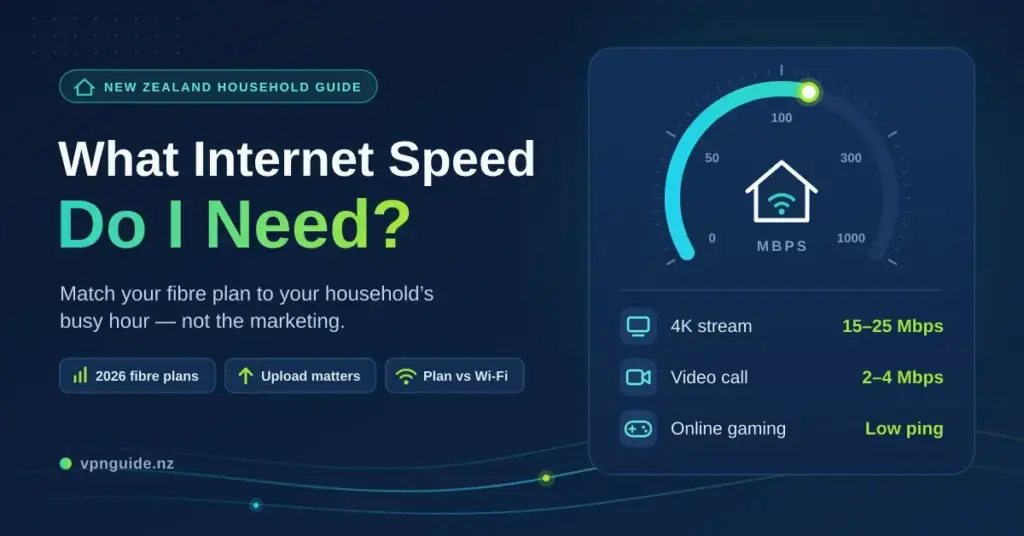
A single activity uses a surprisingly small slice of a modern connection. The figures below are per stream or per person, and they describe the bandwidth an activity consumes while it is running — not a recommendation for the size of plan you should buy. “Mbps” means megabits per second, the standard measure of speed; “bandwidth” is simply how much data can flow at once, like the width of a pipe.
| Activity | Download needed | Upload needed | What matters most |
|---|---|---|---|
| Web browsing, email, music | 1–3 Mbps | Under 1 Mbps | Low latency |
| HD (1080p) video streaming | ~5 Mbps | Under 1 Mbps | Consistency |
| 4K (UHD) video streaming | 15–25 Mbps | Under 1 Mbps | Consistency |
| Video call (Teams, Zoom, FaceTime) | 2–4 Mbps | 2–4 Mbps | Upload & jitter |
| Online gaming | 3–6 Mbps | 1–2 Mbps | Ping, not speed |
| Large game or app download | As much as you have | — | Raw speed (a 100 GB game is ~2 hours at 100 Mbps, ~15 minutes on Fibre Max) |
| Cloud backup, photo sync, posting video | — | As much as you have | Upload speed |
| Security camera (each) | — | 2–4 Mbps continuous | Upload speed |
Note how modest the streaming numbers are. Netflix itself recommends about 5 Mbps for Full HD and 15 Mbps for 4K; the 20–25 Mbps often quoted simply adds headroom so a single 4K stream never stutters on a shared line. Crucially, picture quality is capped by the streaming service, not by your plan — once you are past the threshold for a given resolution, extra megabits change nothing on screen.
Why upload is the number most people get wrong
Broadband plans are advertised on their download speed, and most speed guides ignore upload entirely. Yet upload is what carries you out to the internet: your side of a video call, cloud backups, security-camera footage, and anything you post or share. When a connection feels broken during a work call while a backup is running, upload congestion is usually the culprit. In the Commerce Commission’s independent testing, fibre plans measured roughly 25 Mbps up on Fibre 100, about 109 Mbps up on Fibre 500 and around 502 Mbps up on Fibre Max, while copper VDSL managed only about 21 Mbps and 4G fixed wireless about 23 Mbps — which is exactly why a single call can break up on those older connections. You can see the full methodology in the Commerce Commission’s Measuring Broadband New Zealand reports.
Latency and jitter matter more than the headline number
For everything interactive — gaming, video calls, loading pages — responsiveness beats raw speed. Latency (also called ping) is the round-trip delay for data, measured in milliseconds; jitter is how much that delay wobbles from moment to moment. Fibre delivers very low, steady latency, typically single digits to the low tens of milliseconds within New Zealand, which is why gaming and calls feel crisp on any fibre tier regardless of price. Fixed wireless and satellite add more delay and more jitter, and copper more still. A cheaper fibre plan with 5 ms ping will out-perform a faster-on-paper wireless plan with 40 ms of jitter for anything that needs a quick back-and-forth.
Working out your household’s busy-hour demand
The mistake behind most over-buying is adding up a whole day of usage. What actually matters is the busy hour: the peak moment when the most people are online at once, usually a weekday evening. Add together only the activities that overlap. A demanding evening might be two 4K streams, one video call and someone gaming — roughly 60 Mbps down and 5 Mbps up combined. That sits comfortably inside a Fibre 100 connection on paper, but leaves almost no headroom if a large game download kicks off in the background, which is where a faster plan quietly earns its keep.
A simple way to size a plan: total your realistic busy-hour download, then add a comfortable buffer of 50–100 per cent so background tasks never choke the people who are actively using the connection. For most families that maths lands on Fibre 500, and for one or two light users it lands on Fibre 100.
Matching your household to a plan
| Household | Plan that fits | Approx. measured average (Report 28, July 2026) |
|---|---|---|
| One or two people, streaming and browsing | Fibre 100 | ~106 Mbps down / ~25 Mbps up |
| Family with several screens, some working from home | Fibre 500 | ~508 Mbps down / ~109 Mbps up |
| Heavy uploaders, large households, creators, serious gamers | Fibre Max | ~877 Mbps down / ~502 Mbps up |
| Businesses, multi-gig home networks | Hyperfibre 2000–8000 | Needs a gigabit-plus modem and cabling to actually reach it |
Why Fibre 500 is the sensible 2026 default
For most homes, Fibre 500 is now the obvious pick. After the Chorus Big Fibre Boost from June 2025, the old 300 Mbps plan became 500 Mbps at no extra wholesale cost (and the entry 50 Mbps plan became 100 Mbps), so more than four in five of Chorus’s fibre customers are now on 500 Mbps or faster. Retail providers pass much of that through, and the price gap from Fibre 100 to Fibre 500 is often only a few dollars a month — enough that the extra upload and headroom are usually worth taking. You can compare the tiers in more detail in our fibre speed guide, and see who sells what in our New Zealand broadband provider guide.
When Fibre Max or Hyperfibre earns its price
Fibre Max and Hyperfibre only pay off in specific cases: you routinely move very large files, back up huge volumes to the cloud, upload video for a living, or have many heavy users online at once. They do not make streaming look better, because 4K is capped well below 25 Mbps per screen, and they do not lower ping for gamers, because fibre latency is already flat across tiers. Hyperfibre also needs a gigabit-capable modem and good internal cabling before you will see the numbers — without those, you are paying for speed the hardware cannot deliver.
If fibre is not available where you live
Roughly a quarter of New Zealand cannot get fibre, and the choice there has changed dramatically. Fixed wireless (4G/5G to a home modem) suits light users and browsing, but it shares a cell tower with everyone nearby, so it slows in the evening and struggles with several 4K streams at once. The Commerce Commission’s review of rural connectivity as a market reset in motion tracks how quickly this is shifting.
Starlink, the low-earth-orbit satellite service, has become New Zealand’s largest rural internet provider, at about 27 per cent of rural residential connections. Its Residential tiers measured roughly 130 Mbps (Residential 100) and 245 Mbps (Residential Max) with around 25 ms latency in mid-2026 — enough to handle most households comfortably, including video calls and multiple streams. Current pricing and tiers are listed on Starlink’s New Zealand service plans page, and we cover the hardware and running costs in our Starlink New Zealand guide.
Copper is on the way out. Chorus has brought its nationwide copper-retirement date forward to the end of 2028, so anyone still on an ADSL or VDSL line should plan a move to fibre, fixed wireless or satellite rather than pay for a faster copper plan that will not exist much longer. The industry’s copper retirement information explains what happens to affected landlines and connections.
Broadband technology comparison
| Technology | Typical speed (mid-2026) | Latency | Best suited to |
|---|---|---|---|
| Fibre 100 | ~106 / 25 Mbps | Very low, steady | One or two people, streaming and browsing |
| Fibre 500 | ~508 / 109 Mbps | Very low, steady | Most families and work-from-home homes |
| Fibre Max | ~877 / 502 Mbps | Very low, steady | Heavy uploaders, creators, large busy homes |
| 4G/5G fixed wireless | Variable, ~23 Mbps up | Moderate, rises at peak | Light users where fibre is unavailable |
| Starlink Residential | ~130–245 Mbps down | ~25 ms | Rural homes beyond the fibre and cell footprint |
| Copper (VDSL/ADSL) | Up to ~21 Mbps up | Higher | Being retired by end of 2028 — plan to move off |
Test what you already have before you upgrade
Before switching to a bigger plan, measure the connection you already pay for — a faster plan cannot fix a Wi-Fi problem. First, run a speed test on a device plugged into the router with an Ethernet cable, then run it again over Wi-Fi from the room where things feel slow. If the wired result matches your plan but the Wi-Fi result is far lower, the answer is better Wi-Fi coverage, not more megabits — our Wi-Fi extender and mesh guide covers how to fix dead zones. If both the wired and wireless results sit well below what you pay for, work through our guide to why your internet is slow, which checks the common causes in order.
Common mistakes when picking a plan
- Buying speed to fix a Wi-Fi problem. If the slowdown only appears in certain rooms, the plan is fine — the signal is not reaching you.
- Ignoring upload. Working from home, cameras and cloud backups all lean on upload, which is where cheaper plans and older technologies fall short.
- Chasing megabits for streaming. Above about 25 Mbps per screen, extra speed does nothing for picture quality.
- Confusing speed with responsiveness. Gamers and callers need low, steady latency, not a big number; a fast wireless plan with high jitter still feels laggy.
- Paying for capped data you do not need. Nearly all New Zealand fibre plans are unlimited, and the average fibre home already used about 731 GB a month by mid-2026, so a capped plan rarely saves money for the risk.
Disclaimer: This article is general information only, not advice on a specific plan or provider. Bandwidth figures per activity are typical values published by the services themselves; measured plan averages come from the Commerce Commission’s Measuring Broadband New Zealand programme and vary by provider, modem, internal wiring and time of day. Prices, plans and availability change — check directly with providers before buying.
Sources
- Commerce Commission — Measuring Broadband New Zealand reports
- Commerce Commission — Measuring Broadband New Zealand Report 28 (July 2026)
- RNZ — Chorus to boost fibre speeds (Big Fibre Boost)
- Chorus — The Big Fibre Boost
- Commerce Commission — Rural connectivity: a market reset in motion
- Starlink — New Zealand service plans
- Telecommunications Forum — Copper retirement
- Netflix — Recommended internet connection speeds
Frequently asked questions
What internet speed do I need for Netflix in 4K?
Netflix recommends about 15 Mbps for a single 4K stream and 5 Mbps for HD; allowing 20–25 Mbps per screen gives comfortable headroom. Any fibre plan handles several streams at once, so on most evenings the real limit is Wi-Fi reaching the television, not your plan.
Is Fibre 100 enough for a family?
Often yes for streaming and browsing, but its ~25 Mbps upload gets tight once you add video calls, cloud backups and security cameras. Fibre 500 usually costs only a little more, roughly quadruples upload, and is the plan most New Zealand homes are now on.
What speed do I need to work from home?
A video call needs only 2–4 Mbps each way, so the requirement is a steady upload and low jitter rather than a fast plan. Fibre 100 or better on a wired connection is comfortable; fixed wireless can struggle at peak evening times when the local tower is busy.
Do I need Fibre Max for gaming?
No. Gaming uses only a few megabits; what it needs is low ping, and fibre already delivers single-digit to low-double-digit latency on every tier. Fibre Max only helps you download large games faster — it does nothing for in-game responsiveness.
Is 300 Mbps still a plan in New Zealand?
Mostly not. Chorus upgraded 300/100 plans to 500/100 from June 2025 at no extra wholesale cost. If a speed test still shows around 300 Mbps, ask your retail provider whether the Big Fibre Boost has been applied to your account.
How much data does a household need each month?
Nearly all New Zealand fibre plans are unlimited, so for most people the answer is simply “don’t worry about it”. The average fibre household used about 731 GB a month by mid-2026, and a large minority passed a terabyte, which is why capped plans rarely make sense.