
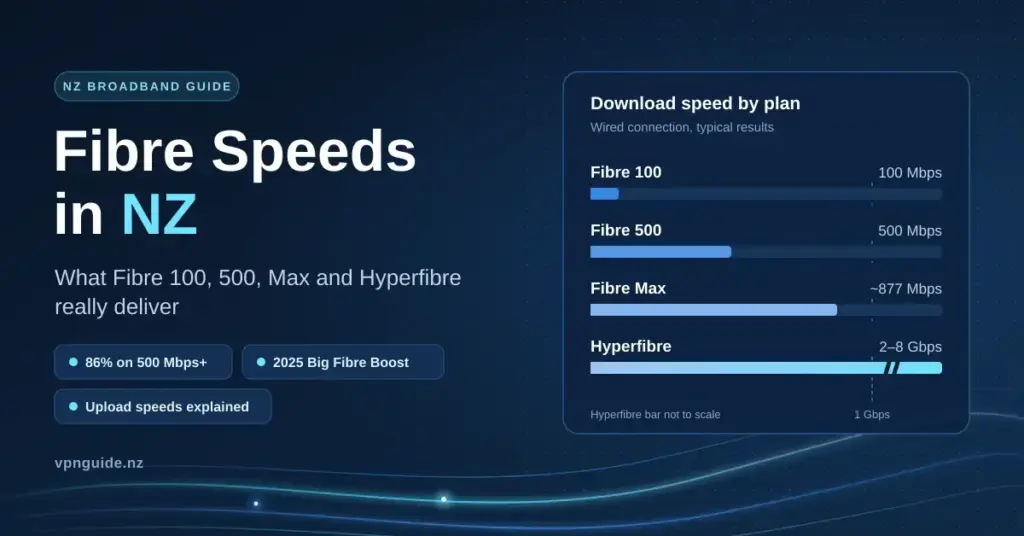
Fibre plans in New Zealand are sold as Fibre 100, Fibre 500, Fibre Max and Hyperfibre, and for once the marketing is close to honest: on a wired test, measured speeds sit at or slightly above the number on the plan. What the ads rarely mention is how much upload you get, which tier most homes are actually on, and where the speed quietly disappears once fibre reaches your house. This guide walks through the measured figures, the 2025 upgrade that reshaped the tiers, and how to tell whether your own connection is pulling its weight.
Key Facts
- Plan names: Fibre 100, Fibre 500, Fibre Max and Hyperfibre — measured speeds sit at or just above the number on the plan.
- Most common plan: around 86 per cent of Chorus fibre connections run at 500 Mbps or faster.
- Fibre Max reality: about 877 Mbps down and 502 Mbps up on a wired test, not the full 1,000 Mbps.
- Big Fibre Boost: in June 2025 Chorus lifted 50/10 to 100/20 and 300/100 to 500/100 at no extra wholesale cost.
- Where speed is lost: almost always inside the home — Wi-Fi, cabling, ports or an ageing modem, not the fibre line.
Measured fibre speeds in 2026
The Commerce Commission — the government agency that regulates telecommunications — tests real household connections through its Measuring Broadband New Zealand programme. Rather than a one-off online check, it runs continuous measurements from small units installed in volunteer homes. Report 28, published in July 2026 from testing carried out in April 2026, produced the national averages below. “Mbps” means megabits per second, the standard measure of connection speed; “latency”, shown in milliseconds (ms), is the short delay before data starts moving — lower is better for calls and gaming.
| Plan | Download | Download at peak | Upload | Latency |
|---|---|---|---|---|
| Fibre 100 | 106 Mbps | — | 25 Mbps | 6 ms |
| Fibre 500 | 508 Mbps | 506 Mbps | 109 Mbps | 7–8 ms |
| Fibre Max | 877 Mbps | 872 Mbps | 502 Mbps | 5 ms |
| VDSL copper (for comparison) | 63 Mbps | 62 Mbps | 21 Mbps | 20 ms |
Fibre Max is advertised as “up to a gigabit” (1,000 Mbps). The 877 Mbps figure is what a typical household sees on a cabled test once the modem’s own overheads and home equipment are counted — the line itself runs close to the roughly 940 Mbps ceiling that protocol overhead allows. The number that really separates fibre from everything else is the peak-hour column: it barely drops in the evening, because fibre is not a shared medium in the way cable, fixed wireless or satellite are.
Upload speed is the figure worth reading twice. It carries your side of a video call, cloud backups, photos syncing to the cloud, and anything you host or share. Copper VDSL — the older phone-line broadband still used where fibre has not reached — manages only around 21 Mbps up and far higher latency, which is why fibre feels sharper even when download numbers look similar.
The Big Fibre Boost
Chorus, the company that owns most of the country’s fibre network, reshaped the tiers in June 2025 in a change it called the Big Fibre Boost. The entry 50/10 wholesale plan became 100/20, and the popular 300/100 plan became 500/100, with no change to the wholesale price. Roughly 700,000 households were moved up automatically. From 1 July 2025 the wholesale plans were renamed Home Fibre Starter, Home Fibre 100, Home Fibre 500 and Home Fibre 920, with Home Hyperfibre at 2000, 4000 and 8000 Mbps; most retailers still sell them to you as Fibre 100, Fibre 500 and Fibre Max.
If your plan predates the boost and a wired speed test still shows about 300 Mbps, contact your provider. The upgrade should have applied automatically, and the usual reason it looks as though it did not is a modem that cannot pass more than 500 Mbps, or a test run over Wi-Fi rather than a cable. Our guide to testing and optimising your connection explains how to run a clean, comparable test.
Which tier New Zealand is actually on
Chorus reported 1,147,000 fibre connections at 30 June 2026, a 75.9 per cent uptake where fibre is available, with around 86 per cent of connections running at 500 Mbps or faster, according to its 2026 annual results. The average household moved 731 GB a month, up about 9 per cent on the year, and one in five used more than a terabyte. Fibre 100 is now the minority plan, and it is priced accordingly — the gap to Fibre 500 is often only a few dollars a month, which is why most homes may as well take the faster tier.
Choosing between the tiers
Fibre Tiers Compared
| Tier | Download / upload | Best for | Worth knowing |
|---|---|---|---|
| Fibre 100 | ~106 / 25 Mbps | One or two people, streaming and browsing | 25 Mbps upload is the real limit for video calls plus backups |
| Fibre 500 | ~508 / 109 Mbps | Most households | Handles working from home, cameras and several 4K streams at once |
| Fibre Max | ~877 / 502 Mbps | Large households, creators, heavy uploaders | Needs gigabit ports and Wi-Fi 6 or 7 to feel different |
| Hyperfibre 2000–8000 | 2–8 Gbps symmetrical | Businesses, home labs, multi-gig networks | Needs a Hyperfibre ONT and 2.5G or 10G cabling; Wi-Fi cannot use it |
For many homes the reason to move above Fibre 100 is upload, not download. Streaming quality stops improving above roughly 25 Mbps per screen, so several people can each watch 4K on Fibre 100’s download without trouble — it is the 25 Mbps upload that strains under simultaneous video calls, camera uploads and backups. If you work from home or run security cameras, Fibre 500’s 109 Mbps upload is the comfortable floor, and Fibre Max only feels different once the rest of your home network can keep up.
Where the speed goes
Fibre delivers to the ONT (Optical Network Terminal) — the white box on the wall, usually fitted by Chorus or your local fibre company. Everything past that box is your own network, and that is where the large majority of “slow fibre” complaints actually start. Before blaming the plan, work through the four usual suspects.
- Wi-Fi. Older Wi-Fi 5 gear rarely passes 300 Mbps in a real room, no matter how fast the line is. Wi-Fi 6 and Wi-Fi 7 modems do far better, and Wi-Fi 7 can use the 6 GHz band New Zealand opened for home use in August 2022. A modern router or, for larger homes, a mesh or extender setup is often the single biggest fix.
- Ports and cables. One 100 Mbps switch, an old powerline adapter or a damaged lead will cap a Fibre 500 connection at about 94 Mbps. Use gigabit ports throughout and Cat 5e cabling or better; our guide to home network cabling explains the categories.
- The device. Many phones and older laptops simply cannot reach 800 Mbps over Wi-Fi, so a slow reading is sometimes the test device rather than the connection.
- The ONT and modem. A flashing PON light or a red LOS (Loss of Signal) light points to a network-side fault, not a setting you can change. Chorus’s ONT support page explains each light, and our guide to how the modem and router differ helps you tell which box a fault sits behind.
To find out which of these applies to you, run a speed test over a cable plugged straight into the router, then repeat it over Wi-Fi from the far end of the house. If the wired number matches the table above, the plan is fine and the home network is the project; if even the wired test is slow, it is time to talk to your provider or check whether the connection has dropped entirely.
Who runs the fibre where you live
Chorus covers most of the country, but four regional fibre companies run the network elsewhere: Enable in Christchurch and wider Canterbury; Tuatahi First Fibre in Hamilton, Tauranga, New Plymouth and the Whanganui region; and Northpower Fibre in Whangārei and Kaipara. Plan tiers and speeds are broadly the same across all four. In every case you buy your plan from a retail provider — Spark, One NZ, 2degrees and many smaller ISPs — rather than from the network company, and any fault is reported through that provider.
How to run an accurate speed check
A speed test is only as trustworthy as the way you run it, and most disappointing results come from the method rather than the connection. A few habits make the number meaningful.
- Test over a cable first. Plug a laptop straight into the router with an Ethernet lead. This removes Wi-Fi from the equation and shows what the plan really delivers; only then compare it against Wi-Fi.
- Use a nearby server. A New Zealand or Australian test server gives a fair reading; a distant one inflates latency and can understate speed.
- Close other traffic. Pause big downloads, cloud backups and other devices, since they share the same connection and drag the result down.
- Test more than once. Run it a few times, at different points in the day, and treat the typical result — not the single best or worst — as your real speed.
Read the upload and latency figures too, not just download. If a wired test lands near the averages in the table above and only Wi-Fi is slow, the fix is inside your home network; if the wired test is well short on the right plan, that is the point to raise it with your provider.
From copper to fibre: how New Zealand got here
New Zealand’s fibre rollout is one of the most complete in the world, but it is recent. The government’s Ultra-Fast Broadband programme began in 2011 and largely replaced the copper phone lines that carried the country’s first internet connections in the 1990s. Fibre now passes the vast majority of urban addresses, and copper is being switched off in areas where fibre is available. That history matters for one practical reason: if you have lived in the same home for years, the wiring, modem and even the plan you are on may predate the current tiers — which is exactly why a fresh wired speed test and a quick look at your plan name are worth the five minutes.
Disclaimer
General information only. Plan names and Chorus connection figures are current as at September 2026; the measured speeds are national averages from the Commerce Commission’s Report 28 and will differ from any single connection, address or time of day.
Sources
Frequently asked questions
What is the fastest fibre speed in NZ?
Hyperfibre 8000, at up to 8 Gbps symmetrical (the same speed up and down), where the local fibre company offers it. For ordinary households Fibre Max is the top tier, measuring about 877 Mbps down and 502 Mbps up on a wired test.
Is Fibre 500 fast enough?
For nearly every household, yes. It is the tier around 86 per cent of Chorus fibre connections run at, and its 109 Mbps upload covers video calls, cloud backups and security cameras with room to spare.
Why does my fibre never reach 1,000 Mbps?
Fibre Max is sold as up to a gigabit; the measured average is about 877 Mbps on a wired test, because modem overheads and home equipment take a slice. Over Wi-Fi, or through a single 100 Mbps port anywhere in the chain, you will see far less. Always test with a cable first.
What upload speed does fibre give in NZ?
About 25 Mbps on Fibre 100, 109 Mbps on Fibre 500 and 502 Mbps on Fibre Max. Older copper VDSL manages only around 21 Mbps, which is why fibre feels much faster for calls and uploads.
Do I need a new modem for Fibre Max?
Usually a Wi-Fi 6 or Wi-Fi 7 modem with gigabit ports to actually notice the difference. Wi-Fi 5 hardware tops out around 300 Mbps in real rooms, so an ageing modem can quietly cap a fast plan.


