
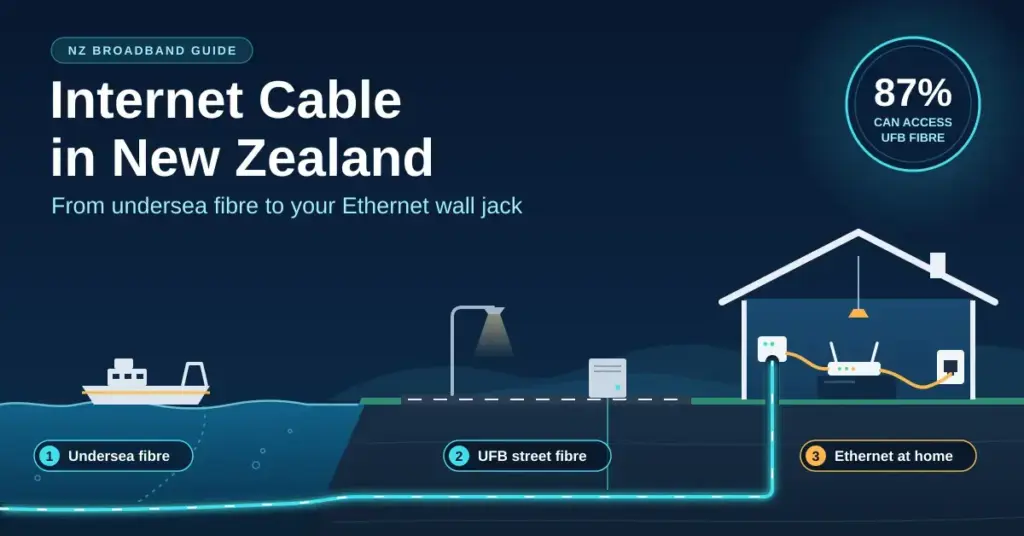
When New Zealanders talk about an “internet cable”, they can mean three very different things: the undersea fibre-optic lines the width of a garden hose that link Aotearoa to the rest of the world, the Ultra-Fast Broadband (UFB) fibre buried under your street, or the humble Ethernet lead that runs from your router to a smart TV. Each one sits at a different point in the chain, and a weak link anywhere along it can throttle an otherwise fast connection. New Zealand is now a fibre-first country: roughly 87% of the population can access the UFB fibre network, whose nationwide build was completed in December 2022, while a shrinking number of homes still use coaxial cable, fixed wireless or legacy copper. This guide explains the main cable types in plain English, how a fibre connection reaches your house, how to wire your home so it keeps up, and how to diagnose the faults that usually turn out to be a cable problem.
Key Points
- Fibre-first country: about 87% of New Zealanders can access UFB fibre, with the nationwide build completed in December 2022.
- Three cables, one chain: undersea fibre links NZ to the world, UFB fibre runs to your street, and Ethernet wires devices inside your home.
- Cat6 vs Cat6a: Cat6 reaches 10 Gbps only over short runs (~37–55 m); Cat6a holds 10 Gbps across the full 100 m.
- Fibre is fragile: the thin yellow ONT patch lead has a glass core — never bend, pinch or splice it.
- Copper is going: Chorus is retiring copper by 2028, with fibre-area copper withdrawn by the end of 2026.
The evolution of internet cabling in New Zealand
New Zealand’s networked history stretches back well before the internet. The first electric telegraph line opened between Lyttelton and Christchurch in 1862, and on 26 August 1866 the first submarine cable across Cook Strait connected the North and South Islands, running between Lyall Bay in Wellington and White’s Bay in Marlborough. A decade later, in 1876, the first international submarine cable linked Cable Bay near Nelson to Sydney, cutting the time to reach Britain from months by ship to days by wire. Those copper telegraph lines eventually grew into the national telephone network, which carried the country’s first dial-up and then ADSL internet.
The decisive shift came with the Ultra-Fast Broadband programme, launched in 2009 as a multi-billion-dollar public-private build to replace copper with glass-core fibre. Fibre-optic cable carries data as pulses of light rather than electrical current, so it is faster, immune to electromagnetic interference and largely free of the distance penalty that slowed copper.
From telegraph to Hyperfibre
On old copper lines, the further you lived from the telephone exchange, the slower your broadband became, because the electrical signal weakened over distance. Fibre removed that penalty almost entirely: light pulses barely degrade over the short runs used inside a city. Today the same glass in the ground supports Chorus Hyperfibre, which uses a technology called XGS-PON to offer symmetrical residential plans of 2, 4 and 8 Gbps and a platform capable of up to 10 Gbps — speeds that copper could never approach.
The main types of internet cable used in New Zealand
Most home connections rely on one of a handful of physical media. Understanding which one reaches your property helps set realistic speed expectations and explains why some suburbs get gigabit fibre while others are stuck at a fraction of that.
- Fibre-optic (FTTP): a hair-thin glass strand that carries light. This is the gold standard behind UFB and Hyperfibre, and the default in almost every new subdivision.
- Coaxial (HFC): a shielded copper cable originally built for pay-TV, reused for broadband in parts of Wellington, Kapiti and Christchurch under One NZ’s FibreX brand.
- Twisted-pair copper (DSL): the old telephone lines used for ADSL and VDSL, now being retired wherever fibre is available.
- Ethernet (Cat5e/Cat6/Cat6a): the twisted-pair copper leads that wire devices inside your home to the router.
For a wider view of which technologies your address can actually order — including fixed wireless and rural options — the guide to New Zealand internet providers is a useful companion, and rural households increasingly compare fibre against Starlink satellite broadband where no cable reaches the property.
Comparison
| Connection type | Physical cable | Typical speed | Where it is used in NZ |
|---|---|---|---|
| Fibre (FTTP / UFB) | Fibre-optic (glass) | 300 Mbps–8 Gbps | Most towns and cities; default for new builds |
| Hyperfibre | Fibre-optic (XGS-PON) | 2, 4 or 8 Gbps symmetric | Selected fibre areas, on the same street glass |
| HFC (FibreX) | Fibre + coaxial copper | Up to ~1 Gbps | Parts of Wellington, Kapiti and Christchurch |
| VDSL / ADSL | Twisted-pair copper | ~10–70 Mbps | Legacy lines, being retired by 2028 |
| Ethernet (in-home) | Cat5e/Cat6/Cat6a copper | 1–10 Gbps | Wiring devices to the router inside the home |
The role of Hybrid Fibre-Coaxial (HFC)
In parts of Wellington, the Kapiti Coast and Christchurch, One NZ (formerly Vodafone) runs a hybrid fibre-coaxial network marketed as FibreX. Fibre carries the signal most of the way to a roadside node, then a coaxial cable covers the final run into the home. Using DOCSIS 3.1 technology, FibreX can deliver plans up to about 1 Gbps and reaches roughly 85% of Wellington, around two-thirds of Christchurch and parts of Kapiti. It is a capable network, but full fibre-to-the-premises (FTTP) is generally preferred for new installs because it is symmetrical, more future-proof and unaffected by the copper segment. One NZ’s history and network are documented on its One NZ background page.
Undersea cables: New Zealand’s digital lifelines
Almost all of New Zealand’s international data travels through a small number of submarine fibre-optic cables lying on the ocean floor. These are the country’s real connection to the global internet, and because there are so few of them, the network is more fragile than most people realise. The main systems are:
- Southern Cross Cable Network: the long-standing trans-Pacific system linking New Zealand, Australia and the United States.
- Southern Cross NEXT: a newer 72 Tbps cable that went live in May 2022, roughly doubling capacity on the New Zealand–US route.
- Hawaiki Cable: an independent 43 Tbps trans-Pacific link connecting New Zealand to Australia and the US, in service since 2018.
- Tasman Global Access (TGA): a dedicated cable between New Zealand and Australia that adds trans-Tasman resilience.
Because these cables can be cut by ship anchors, undersea landslides or earthquakes, redundancy matters. New Zealand spreads its risk across several independent systems and multiple landing stations, so that if one cable is damaged, traffic can be rerouted to keep the country online.
Why redundancy is not optional
The stakes were made clear by the January 2022 Hunga Tonga volcanic eruption, which severed Tonga’s single international cable and cut the nation off for weeks. New Zealand avoids that single point of failure by carrying international traffic across more than one cable owner and more than one physical route. For everyday users this is invisible — until it isn’t — which is why cable investment continues even though the current systems are far from full.
Home wiring: Cat5e vs Cat6 vs Cat6a
The fibre coming off the street is only half the story. Inside the house, performance often depends on the Ethernet cable you use to connect fixed devices to your home router. Many older New Zealand homes were wired with Cat5 or Cat5e, which was fine for 100 Mbps and adequate for 1 Gbps but leaves no headroom for faster plans. For anything you are wiring today, Cat6 or Cat6a is the sensible choice — the two look almost identical but behave very differently at 10 Gbps over distance.
| Cable category | Max speed (typical) | 10 Gbps distance | Best use in a NZ home |
|---|---|---|---|
| Cat5e | 1 Gbps | Not supported | Basic browsing, older smart TVs, existing runs |
| Cat6 | 1 Gbps (10 Gbps short runs) | Up to ~37–55 m | Home offices, gaming, 4K streaming |
| Cat6a | 10 Gbps | Full 100 m | Future-proofing, whole-home 10 Gbps wiring |
| Cat8 | 25–40 Gbps | Up to 30 m only | Data centres, short server-to-switch links |
The key takeaway: Cat6 can reach 10 Gbps, but only over short cable runs of roughly 37 to 55 metres. If you want reliable 10 Gbps to every room, Cat6a is the cable that holds that speed across the full 100-metre limit.
Why “star wiring” is the NZ standard
New Zealand’s telecommunications guidelines recommend a “star” layout for new builds. In this setup every RJ45 wall jack — in bedrooms, the lounge and the office — has its own dedicated cable running back to a central home distribution point, rather than being daisy-chained off another socket. This gives each device a clean, full-speed link and makes faults far easier to isolate later.
How a fibre connection reaches your home
Getting fibre installed is a staged process run by your Local Fibre Company (LFC) — Chorus in most of the country, or Enable, Northpower or Tuatahi First Fibre in specific regions — while your retail provider handles the plan itself. A “lead-in” cable runs from a connection point in the street to an External Termination Point (ETP) on your outside wall, then a thin internal fibre continues to an Optical Network Terminal (the ONT, or internet box) inside. The ONT converts the light signal into the electrical signal your router understands.
- Scope: a technician visits to plan the cable route — aerial from a pole, underground, or along a fence line.
- Build: the physical lead-in cable is installed from the street to the ETP on your wall.
- Connect: the internal fibre and ONT are fitted, and the light signal is tested.
- Activate: your retail ISP (Spark, One NZ, 2degrees and others) switches the plan on remotely.
- Plug in: you connect your Wi-Fi router to the ONT with an Ethernet cable and you are online.
Aerial vs underground lead-ins
In many older suburbs the fibre still arrives overhead from a power pole; in newer areas it is buried in a green telecommunications conduit. If you ever pour a new driveway or dig in the garden, protect that green pipe — repairing a crushed underground fibre lead-in is slow and expensive, and it is not something a homeowner can fix.
Troubleshooting internet cable problems
Most connection faults are not caused by the network out in the street but by the last metre of cable inside your home. A damaged Ethernet lead or a pinched fibre patch cord can cause dropouts, lag spikes on video calls, or speeds that stubbornly refuse to rise. Fibre in particular is glass: bending the thin patch lead too sharply causes “macro-bend” loss, where light literally leaks out and the signal fails.
| Symptom | Likely cable cause | What to try |
|---|---|---|
| Speed capped at 100 Mbps | Old or faulty Cat5 cable, or a Fast Ethernet port | Swap in a known-good Cat6 lead; check for a Gigabit port |
| Red “LOS” light on the ONT | Loss of signal — usually an external fibre break | Report a line fault to your ISP; do not open the ONT |
| Intermittent dropouts | Loose RJ45 plug or damaged connector | Reseat every plug until it clicks; replace bent leads |
| Slower than expected on wired | Interference or a kinked fibre patch lead | Keep cables clear of power bricks; uncoil the fibre gently |
If speeds still look wrong after checking the cabling, run a wired broadband speed test plugged directly into the ONT to separate a cable fault from a Wi-Fi or plan issue.
The delicate “yellow cable” warning
The thin yellow lead between your ONT and the fibre wall socket is the most fragile part of your setup. Unlike a copper Ethernet cable, it has a glass core: if it is stepped on, chewed by a pet or bent at a sharp right angle, the glass can fracture. Never try to splice or repair it yourself — buy a pre-terminated fibre patch lead of the correct type from a specialist retailer such as PB Tech and swap it in.
Wired jackpoints and whole-home distribution
For the most stable experience, the cabling should not stop at your router. Wired jackpoints matter most for devices that need consistent throughput and low lag — desktop PCs, smart TVs, gaming consoles and network storage. A practical rule for a modern New Zealand home is to treat RJ45 sockets like power outlets: you rarely regret having too many.
- RJ45 outlets: the standard Ethernet wall socket used throughout NZ homes.
- Home distribution box: the central hub where every internal cable meets the ONT and router.
- Patch panels: used in larger homes to keep dozens of connections organised.
- Power over Ethernet (PoE): a single cable that carries both data and power to devices like security cameras or Wi-Fi access points.
- Shielded cable: worth using where a data run must sit close to mains wiring.
Wiring up to free the Wi-Fi
Wi-Fi is convenient but shares the airwaves with your neighbours, and in dense urban streets that congestion drags speeds down. Running Cat6 to stationary devices does two things at once: it gives those devices a rock-solid link, and it frees up wireless bandwidth for the phones and tablets that genuinely need to roam. If you want to also lock down that home network, our overview of a typical Spark home Wi-Fi setup covers modem modes and settings that apply to most NZ routers.
Cabling for New Zealand’s climate and terrain
New Zealand’s environment — salt-laden coastal air, strong UV and seismic activity — shapes how outdoor cable is built. External fibre used by Chorus is UV-stabilised to survive decades of sun, underground runs sit in conduit to resist roots and rodents, and industrial sites use oil- and abrasion-resistant jackets. Modern fibre also uses bend-insensitive glass (the G.657 standard), which tolerates tighter curves and movement far better than older fibre — a genuine advantage in a country that shakes.
Fibre vs copper longevity
Copper corrodes and oxidises over time, which is what produced the crackle on old landlines and the gradual speed decay on ageing DSL. Fibre, being glass, does not corrode and is immune to electromagnetic interference. That makes it a far more durable long-term investment: fibre placed in the ground today is generally expected to remain serviceable for decades with minimal maintenance.
Hardware you need to hit gigabit speeds
A fast cable is wasted if the hardware at each end cannot keep up. To actually use a 1 Gbps plan, your router and computer both need Gigabit Ethernet ports; many older laptops and cheap devices have “Fast Ethernet” ports capped at 100 Mbps. When buying gear, look for a “10/100/1000”, “2.5G” or “10G” label on the network specification.
- Gigabit router: essential to distribute UFB speeds around the house.
- 2.5G or 10G network card: needed to see beyond 1 Gbps on Hyperfibre plans.
- Cat6 or Cat6a patch leads: connect the PC to the wall jack with quality leads for full throughput.
- A powered, active ONT: the fibre box must be on and showing a healthy optical light.
- A compatible router: it must support the settings your ISP uses to authenticate the connection.
The 940 Mbps “ceiling” explained
A common question on gigabit plans is why a speed test shows around 940 Mbps rather than a clean 1,000. This is normal protocol overhead: a slice of the link’s raw capacity is used to package and manage the data itself, so about 940 Mbps of usable throughput on a 1 Gbps connection means your Cat6 cable and hardware are performing at their physical limit. To exceed it you would move to 2.5 Gbps or 10 Gbps networking gear.
Future-proofing toward 10 Gbps Hyperfibre
With the fibre build essentially complete, New Zealand’s focus has shifted from coverage to capacity. Chorus Hyperfibre, running on XGS-PON, already offers symmetrical residential tiers of 2, 4 and 8 Gbps over the same glass that is in the street today, on a platform rated to 10 Gbps. In other words, the physical cable outside most homes is capable of speeds far beyond what a typical household uses — unlocking them is mainly a matter of a compatible ONT and internal Cat6a wiring.
- Symmetrical speeds: uploads as fast as downloads, valuable for creators, backups and remote work.
- Lower latency: steadier ping for cloud apps, gaming and video calls.
- Headroom: more capacity means the evening “peak” barely dents your speeds.
- Multiple 4K/8K streams: comfortable simultaneous streaming across a busy household.
The end of the copper era
Chorus is retiring its copper network faster than planned. The timetable has been brought forward to 2028 — two years earlier than the previous 2030 target — with copper services withdrawn in areas where fibre is already available by the end of 2026. Copper is only switched off where fibre can replace it, so rural addresses without fibre are not left stranded. If you are still on a VDSL copper line in a fibre area, moving now avoids a rushed switch later and generally brings a more reliable connection during winter storms.
Which connection suits you
For most New Zealand households in a fibre area, FTTP is the clear default: symmetrical options, the longest useful lifespan and the best resilience. In the FibreX footprint, HFC is a solid alternative if fibre is not yet at your door. Rural and lifestyle-block addresses beyond the fibre and cable network are increasingly choosing fixed wireless or satellite. Whatever reaches your street, the cabling inside your walls is the part you control — and investing in decent Cat6 or Cat6a wiring is the cheapest way to make sure the last metre never becomes the bottleneck.
Sources
- Chorus — Copper retirement and withdrawal
- Chorus — Hyperfibre (XGS-PON) announcement
- National Infrastructure — Ultra-Fast Broadband (UFB) programme
- Submarine Networks — Southern Cross NEXT
- One NZ — Internet access types (HFC/FibreX explainer)
- NZ Telecommunications Forum — Copper retirement
- Te Ara — Submarine cables and NZ telegraph history
- trueCABLE — Cat6 vs Cat6a distance and speed
Frequently asked questions
What is the difference between the yellow and blue cables at my ONT?
The thin yellow cable is usually a fibre-optic patch lead connecting the fibre wall socket to your ONT, and it has a fragile glass core. The thicker blue or grey cable is an Ethernet (Cat5e/Cat6) lead carrying the signal from the ONT or router to your devices, and it is far more robust.
Can I use an old phone cable for fibre internet?
No. Fibre carries light and needs optical fibre cable and an ONT. Old copper phone cables were only ever used for ADSL and VDSL and cannot carry a fibre signal, so they play no part in a UFB connection.
Is Cat6 good enough, or should I run Cat6a?
Cat6 comfortably handles 1 Gbps and can reach 10 Gbps over short runs of roughly 37 to 55 metres. If you want dependable 10 Gbps to every room across the full 100-metre limit, Cat6a is the better choice for new wiring.
Why is there a red light on my fibre box?
A red “LOS” (loss of signal) light on the ONT usually means the external fibre is broken or there is a fault upstream. Contact your internet provider to log a line fault; do not attempt to open or repair the ONT yourself.
What happens to my connection when copper is switched off?
In areas where fibre is available, Chorus is retiring copper by the end of 2026, with the wider network gone by 2028. You will be notified in advance and asked to move to fibre or another service; if fibre is not available at your address, your existing service is not cut off.


