
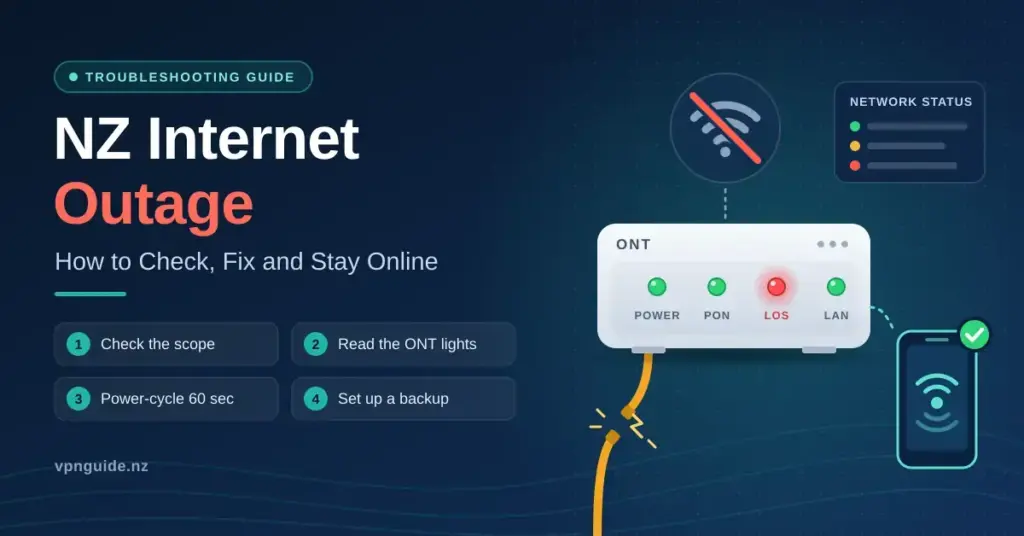
An internet outage can hit an Aotearoa household or business without warning, cutting off streaming, remote work, EFTPOS and even some phone calls. The reassuring news is that most connection failures in New Zealand are either confined to your own home or part of a short, scheduled maintenance window — and there are clear ways to tell which. This guide explains how to spot a genuine network fault, what usually causes downtime here, how to get back online quickly, and how to build a backup so the next drop-out barely slows you down.
Key Points
- First, work out the scope. If only some devices are affected, restart your gear before assuming a network outage.
- Read the ONT lights. A red “LOS” light means a physical line fault; steady green usually means the line is fine.
- Check two maps. Look at both your provider’s status page and the relevant fibre company’s (Chorus, Enable, Tuatahi, Northpower).
- Power-cycle for 60 seconds. Turning the router and ONT off and on fixes a large share of home connection problems.
- Have a backup ready. A mobile hotspot, 5G router or Starlink keeps you online when the main line drops.
- Use a VPN on public Wi-Fi to keep your data private on untrusted networks.
Is it a real outage, or just your connection?
The first job is to work out whether the problem is on your side of the wall or out in the network. A genuine area-wide fault affects every device in the house and usually shows up on your provider’s status map. A local issue — a rebooting router, a loose cable, or Wi-Fi interference — only affects some devices and clears with a restart. Checking a few things in order saves a long wait on hold for a fault that you can fix in minutes.
- Look at the ONT lights. The Optical Network Terminal is the small box on the wall where the fibre enters your home. A steady green “PON” or “Fibre” light is healthy; a red or flashing “LOS” (Loss of Signal) light usually means a physical break in the line that needs a technician.
- Test more than one device. If your phone on mobile data works but nothing on Wi-Fi does, the fault is likely your router or the line, not the whole network.
- Check a status page on mobile data. Every major provider and fibre company publishes an outage map you can reach from your phone.
- Watch for maintenance windows. Most planned work runs overnight, roughly 11pm–6am, to limit disruption.
Where to check the network status
In New Zealand the company that bills you (your Retail Service Provider) is often not the company that owns the cable in the ground. Because of that, it pays to check both your provider’s status page and the relevant fibre company’s map. If the map shows a known fault or planned works in your suburb, there is nothing to fix at home — you simply wait for the estimated restoration time. A broad, plain-English walkthrough of this process is set out in our guide to internet outages in New Zealand.
Where to Check the Network Status
| Organisation | Role | Where to check |
|---|---|---|
| Chorus | National fibre company (largest LFC) | chorus.co.nz |
| Enable | Fibre for Christchurch & Rangiora | enable.net.nz |
| Spark | Retail provider (mobile & broadband) | spark.co.nz |
| One NZ | Retail provider network status | one.nz/help/network-status |
| 2degrees | Retail provider (also Orcon, Slingshot) | 2degrees.nz |
Tip: bookmark these on your phone so you can reach them on mobile data when your home connection is down.
What causes internet outages in New Zealand
Downtime here ranges from simple human error to the forces of nature. New Zealand is prone to earthquakes, storms and fast-moving weather, so physical infrastructure is inherently exposed. The single most common cause of unplanned outages is “civil works damage” — a contractor accidentally severing an underground fibre cable during roadworks or a housing development. This is especially frequent in fast-growing areas. Storms add their own risks, damaging overhead lines or knocking out the power to roadside cabinets, which takes a whole neighbourhood offline.
- Cable cuts (dig-ups): Accidental damage during construction is a leading cause of longer outages and can take many hours to splice back together.
- Hardware failure: An ageing router or a faulty ONT can fail after a power surge or simple wear and tear.
- Scheduled work: Routine “grooming” and software upgrades keep the network reliable but cause brief, planned blips.
- Core network and software faults: Rarely, a configuration or software error inside a provider’s systems can trigger a city-wide or nationwide loss of service.
Software faults deserve a special mention. A single flawed update can ripple across many organisations at once — the July 2024 2024 CrowdStrike-related IT outages grounded flights, froze banks and disrupted businesses in New Zealand and worldwide, even though the underlying fibre was working perfectly. It is a useful reminder that “the internet is down” can sometimes mean a particular service has failed rather than your own connection.
| Cause | How common | Typical duration | First step |
|---|---|---|---|
| Cable cut | Moderate | Several hours to 1–2 days | Wait for LFC repair crew |
| Scheduled maintenance | Regular (often overnight) | 1–4 hours | Check the maintenance notice |
| Storm / power loss | Seasonal | Hours to a full day | Confirm mains power first |
| Router or ONT fault | Individual | Minutes | Power-cycle the hardware |
The 3G shutdown: sometimes it is not an outage at all
New Zealand’s three mobile networks have now retired their 3G services. 2degrees began switching off from December 2025, and One NZ and Spark completed their shutdowns by the end of March 2026, with One NZ turning off cities progressively through March. Spark had earlier pushed its close date out to March 2026 to give customers more time to upgrade.
For some New Zealanders, what looks like an outage is really a hardware compatibility issue. If an older phone, rural broadband modem or connected device relied only on 3G frequencies, it will no longer connect — and no amount of restarting will fix it. The remedy is a 4G- or 5G-capable device. Retiring 3G lets the telcos re-use that spectrum for faster, higher-capacity 4G and 5G, which is part of the wider story of how internet access keeps evolving in New Zealand.
Who actually owns the network
The physical fibre is run by a handful of Local Fibre Companies (LFCs). Chorus operates the largest footprint nationally (roughly two-thirds of the fibre network), while Enable covers Christchurch and Rangiora, Tuatahi First Fibre covers much of the central North Island (including Hamilton, Tauranga, New Plymouth and Whanganui), and Northpower serves Whangārei. When an outage is caused by a physical fault, your retail provider has to coordinate with the relevant LFC to send a technician — which is why repair timeframes are often outside your provider’s direct control.
How to troubleshoot your home connection
Before assuming the worst, run through the standard checks. Many “outages” are really a software glitch in the router or Wi-Fi interference. The golden rule of New Zealand tech support is to power-cycle your hardware: switch off both the router and the ONT at the wall for at least 60 seconds, then power the ONT on first and the router a minute later. This clears cached errors and forces a fresh handshake with the local exchange. If you are still offline after ten minutes, plug a laptop straight into the router with an Ethernet cable to rule out Wi-Fi congestion. Our full step-by-step repair guide walks through each of these checks in order.
- The 60-second reset: Unplug all networking gear for a full minute so it restarts cleanly.
- Inspect the fibre patch cable: The thin cable between the wall and the ONT is glass — a sharp kink can break the signal.
- Isolate the device: If one device works and another does not, the fault is that device, not the network.
- Try a public DNS: Switching to a resolver such as Cloudflare (1.1.1.1) can fix cases where pages will not load even though the modem lights are green.
| Action | What it tests | Desired outcome |
|---|---|---|
| Power-cycle | Router & ONT | Clears software hangs |
| Ethernet test | Router to laptop | Rules out Wi-Fi interference |
| Status check | Provider / LFC map | Confirms if the fault is external |
| Factory reset | Router only (last resort) | Restores default settings |
Congestion is not the same as an outage
In busy apartments and dense suburbs you can see symptoms that feel like an outage — buffering video, laggy calls — that are really congestion. During peak evening hours (roughly 6pm–10pm) the sheer volume of traffic can cause “bufferbloat,” where data packets queue up and latency (ping) climbs even though the connection is technically up. If slowdowns are consistent at the same time each night rather than a total loss of service, the fix is usually a higher-capacity plan, a better home router, or a provider with more international bandwidth, not a fault report.
Reporting a fault to your provider
If your own checks come up empty and the status maps show nothing, report the fault. Most New Zealand providers now lead with digital support — live chat and mobile apps that can run an automatic line test are often faster than the phone queue. When you make contact, describe the ONT lights precisely (for example, “LOS is red” or “PON is flashing”), because that tells the agent whether a technician is needed. If a visit is booked and the fault turns out to be your own equipment rather than the network, some providers charge a “no fault found” callout fee, so it is worth exhausting the home checks first.
- Use the app first: Built-in “test my line” tools can diagnose the fault and log a ticket without a call.
- Record your reference number: Keep the ticket ID so you can track progress.
- Update your contact details: Make sure your mobile number is current to receive proactive outage alerts.
- Ask about credits: Extended outages may entitle you to a pro-rata credit on your next bill.
Your rights: the Consumer Guarantees Act and the TDR
Under the Consumer Guarantees Act 1993, internet services must be supplied with reasonable care and skill. If outages are frequent or a fault drags on for an unreasonable time, you may be entitled to a remedy — anything from a bill credit to cancelling the contract without penalty in serious cases. If you cannot resolve a complaint directly, you can escalate to the free, independent Telecommunications Dispute Resolution (TDR) scheme, provided your provider is a member. Importantly, using the TDR does not remove any rights you already hold under the Consumer Guarantees Act.
Emergency internet backups for Kiwi households
For anyone who works from home or runs a business, a long outage can mean lost income, so a “Plan B” is worth having ready before you need it. The simplest backup is your phone’s personal hotspot over 4G or 5G, though be aware that high-definition video calls can burn through several gigabytes an hour. A growing option is satellite internet such as Starlink Mini, which talks directly to low-earth-orbit satellites and so is immune to local ground faults like cut fibre or flooded cabinets — a big reason many rural New Zealanders use it as either a primary link or a failover. Fixed-wireless and 5G home broadband can also serve as a fully independent second connection.
| Backup option | Strengths | Trade-offs |
|---|---|---|
| Mobile hotspot | Instant, already in your pocket | Data caps, drains the battery |
| Starlink (satellite) | Independent of local cables, works rurally | Higher hardware and monthly cost |
| 5G / fixed wireless | Fast, easy plug-and-play second line | Signal strength varies by area |
| Public Wi-Fi | Free at libraries and cafes | Requires travel; treat as untrusted |
Staying safe on public Wi-Fi
If an outage forces you onto public Wi-Fi at a library or cafe, security should come first. Open networks are frequently unencrypted, which makes it easier for someone on the same network to intercept passwords or financial details. A VPN (Virtual Private Network) wraps your traffic in an encrypted tunnel so your connection stays private even on an untrusted hotspot — an easy habit for anyone who needs to work securely during a network failure.
Preparing a business for a network failure
For a business, an outage is a financial risk, not just an inconvenience. Retailers on cloud EFTPOS or point-of-sale systems can grind to a halt within minutes. The common mitigation is a “Dual-WAN” router that runs two independent connections — typically a primary fibre line and a 5G failover — and switches over automatically within seconds, often before staff even notice. Building that redundancy across different technologies and, ideally, different providers is now standard practice for resilient offices.
- Redundant connections: Pair two technologies (for example fibre and 5G) so a single fault cannot take you fully offline.
- Uninterruptible power supply (UPS): Keeps the modem and router running through a local power cut.
- Cloud backups: Sync critical data so it stays reachable from any location.
- Staff know-how: Make sure the team knows how to switch on a hotspot and who to call.
An outage is the worst moment to discover the backup does not work. IT specialists recommend a “pull-the-plug” test every six months: manually disconnect the primary line and confirm the 5G or satellite failover activates and that essential software keeps running.
Geography, resilience and what is coming next
New Zealand’s long, narrow, mountainous shape makes network resilience genuinely challenging. In regions such as the West Coast or the central North Island, connectivity can hinge on a small number of “backbone” cables, so a landslide or major storm can take out whole towns at once. Cities like Auckland and Wellington tend to have more redundant paths, meaning traffic can be rerouted around a single break. Most of the country’s international traffic also travels through a few undersea cables landing near Auckland, which is why cable diversity is a national priority.
| Region | Typical technology | Common risks |
|---|---|---|
| Auckland | Fibre (UFB) | Civil works, peak congestion |
| Wellington | Fibre | Earthquake risk, high winds |
| Rural NZ | Fixed wireless / satellite | Distance, weather interference |
| South Island | Fibre / wireless | Snow, long-haul cable breaks |
Looking ahead, resilience is improving on several fronts. 5G coverage continues to expand toward most of the population, giving urban and many provincial users a fast wireless alternative that is physically separate from the fibre in the ground. Low-earth-orbit satellite is growing quickly for rural resilience, and “direct-to-cell” satellite services are beginning to let ordinary phones send messages from areas with no tower coverage — a meaningful step toward ending total blackouts during natural disasters. On the fixed-line side, Hyperfibre plans now reach up to 8Gbps and run on more modern, robust hardware, while the government’s Rural Broadband Initiative keeps extending resilient connectivity into provincial New Zealand.
Sources
Frequently Asked Questions
How do I tell if the outage is just my house?
Check whether more than one device is affected and look at the ONT lights on the wall. If your phone works on mobile data but nothing works on Wi-Fi, the issue is likely your router or line. A steady green fibre light with “no internet” often points to a local modem glitch, while a red LOS light points to a line fault that needs a technician.
Who do I call to report an internet outage?
Always contact your Retail Service Provider first — the company you pay your bill to. They coordinate with the network owner, such as Chorus or Enable, to fix infrastructure faults. Reporting the exact ONT light status helps them decide whether a technician visit is needed.
Can I get a refund or credit for an outage?
Many providers offer a pro-rata credit for extended outages, and under the Consumer Guarantees Act 1993 you may have further rights if faults are frequent or prolonged. You usually need to contact the billing team once service is restored, and can escalate unresolved complaints to the free TDR scheme if your provider is a member.
How does the 3G shutdown affect my connection?
All three New Zealand mobile networks retired 3G by early 2026, with One NZ and Spark completing shutdown by the end of March 2026. If an older phone or rural modem only supported 3G, it can no longer connect and restarting will not help — you need a 4G- or 5G-capable device to get back online.
Does rain affect fibre internet?
No. Fibre carries light through glass and is not affected by rain or electrical interference. If bad weather does knock out your connection, it is usually because a storm has damaged an overhead line, cut power to a roadside cabinet, or disrupted an older copper (VDSL) or fixed-wireless link rather than the fibre itself.


