
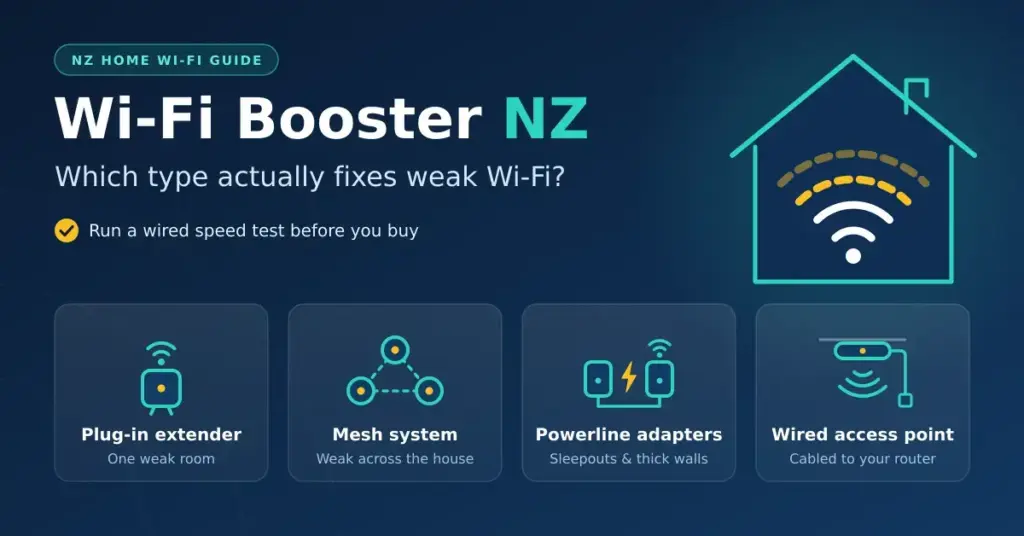
“Wi-Fi booster” is a shop label, not a technical term. Walk into a New Zealand electronics store and it can mean four very different devices — a plug-in extender, a mesh system, a set of powerline adapters or a wired access point — and the one that fixes your home depends entirely on why the signal is weak to begin with. Choose the wrong device and it is the easiest way to spend a hundred dollars or more and change nothing. This guide explains how each type works, where it belongs and how to tell which one your home actually needs.
Key points
- “Wi-Fi booster” covers four different devices — a plug-in extender, a mesh system, powerline adapters and a wired access point.
- Run a wired speed test first: a booster fixes weak coverage, never a slow plan or a faulty line.
- One weak room near good signal points to a well-placed extender; weak signal across the house points to mesh.
- A detached sleepout or thick block walls suit powerline adapters or a cabled access point.
- Free fixes — moving the modem, switching to 5 or 6 GHz, updating firmware — often solve it for nothing.
First, confirm Wi-Fi is actually the problem
Before you buy anything, work out whether weak Wi-Fi is the real culprit or whether the connection itself is slow. Plug a laptop directly into your modem with an Ethernet cable and run a speed test, then repeat the same test over Wi-Fi from the room that struggles.
- If the wired result matches your plan but the Wi-Fi result collapses, coverage is the problem and a booster can help.
- If the wired result is already poor, no booster will rescue it. The bottleneck is your plan, the line into the house or a fault — our slow-internet guide and our guide to testing and optimising your connection work through those causes.
This one test saves the most money, because a booster only ever pushes your existing connection further through the house. It cannot manufacture speed you are not already paying for, and it cannot repair a faulty line. Ten minutes with a cable tells you which problem you actually have.
The four kinds of “booster”
Retailers group every coverage device under “booster” or “range extender”, but they behave very differently and suit different homes. The table below compares them at a glance, and the sections that follow explain when each one makes sense.
Booster types compared
| Type | How it works | Best for | Indicative NZ price (2026) | Main drawback |
|---|---|---|---|---|
| Plug-in extender (repeater) | Picks up your Wi-Fi and rebroadcasts it | One weak room near decent signal | About $40–$120 | Can halve speed; may add a second network name |
| Mesh system | Two or more units act as one network and hand devices over | Whole-home coverage; larger or long homes | About $150–$600+ | Costs more than a single extender |
| Powerline adapters | Carry data through the house wiring to a second Wi-Fi point | Sleepouts, garages, rooms behind thick walls | About $90–$250 | Speed depends on your wiring and circuits |
| Wired access point | A Wi-Fi unit cabled back to the modem by Ethernet | Homes where a cable can be run | About $60–$300 | Needs cabling |
Plug-in extenders (repeaters)
An extender picks up your existing Wi-Fi and rebroadcasts it. A basic single-radio model listens and transmits on the same channel, so it spends half its air time relaying traffic — which is why a cheap extender often halves the speed of anything connected through it. It can also create a second network name that you have to switch between as you move around the house.
Placement decides whether an extender helps or disappoints. It belongs roughly halfway between the modem and the dead zone, where the signal it repeats is still strong. Put it inside the dead zone and it simply rebroadcasts a weak signal to no one’s benefit. A dual-band model that talks to your devices on one band and back to the modem on the other loses far less speed than a single-band unit. Our Wi-Fi extender guide covers choosing and positioning one properly.
Mesh systems
A mesh system uses two or more units that behave as a single network with one name. They steer each device to the nearest unit as you walk through the house, so your phone hands over without dropping the call or the stream. Better tri-band models keep a dedicated radio just for the units to talk to each other, so your devices keep close to full speed instead of sharing it with that “backhaul” traffic.
If you can join the units with an Ethernet cable — known as wired backhaul — performance gets close to having the modem in every room. A two-pack suits most standard homes; three units cover larger, longer or two-storey houses. Mesh costs more than a single extender but is far more reliable across a whole home, and it is the option most people are reaching for when they say “booster”. PB Tech’s round-up of mesh systems shows the range sold here, and our mesh Wi-Fi guide explains how many units you need and where to place them.
Powerline adapters
Powerline adapters send your network data through the existing electrical wiring of the house. You plug one adapter in near the modem and connect it by cable, then plug a second adapter into a socket in a distant room, where it provides a wired port or its own small Wi-Fi network. They are a tidy answer for a detached sleepout, a garage office or a room behind thick concrete-block walls that Wi-Fi cannot cross.
The catch is that performance depends on the age and layout of your wiring. Adapters on the same circuit and close together perform best; older wiring, long runs, or a second adapter on a different circuit or phase can drag real-world speeds well below the headline numbers on the box. They are worth trying where a cable run is impractical, but treat the advertised speed as a ceiling you will rarely reach.
Wired access points
An access point is a Wi-Fi transmitter connected back to the modem by an Ethernet cable. Because the link to the modem is a solid wire rather than a shared radio hop, an access point delivers the most consistent speed of any option here — there is no repeated signal to weaken. The trade-off is the cabling: you need a run of Ethernet to wherever the access point will live.
In a new build or a renovation, running Cat6 cable while the walls are open is the single best investment you can make in home Wi-Fi, and it costs very little on top of the other work. Many modern modems and mesh units can also be wired together this way, giving you mesh convenience with wired reliability.
Why New Zealand homes get dead zones
Weak spots are rarely the fault of your provider. They usually come down to where the gear sits and what the house is built from:
- Where the fibre comes in. The Chorus fibre termination box (the ONT) is often fitted in the garage or at one end of the house, and the modem ends up sitting right beside it — frequently the worst possible spot for whole-home coverage.
- Building materials. Brick, concrete block, tiled bathrooms, foil-backed insulation and steel framing all absorb or reflect Wi-Fi. Older weatherboard and plasterboard homes are far kinder to a signal.
- Long, single-level layouts. A modem at one end of a 25-metre house leaves the far bedrooms clinging to a weak 2.4 GHz signal.
- Two-storey and split-level homes. The signal has to pass through floors as well as walls, so a modem downstairs can leave the upstairs rooms starved.
- Ageing hardware. Wi-Fi 5 (802.11ac) equipment struggles to cover a modern home at full fibre speed. Newer provider modems are much better: Spark’s Smart Modem 3 and Futura both use Wi-Fi 6, while One NZ’s Deco BE28 and Spark’s Nokia 5G Gateway 7 use Wi-Fi 7.
Free fixes to try first
Before spending anything, work through these — they solve a surprising number of “dead zone” complaints for nothing:
- Reposition the modem. Move it to a central, raised, open spot rather than a cupboard or the floor behind the TV. A longer cable from the fibre box to the modem costs only a few dollars and often does more than any booster.
- Use the right band. Connect nearby devices to the 5 GHz band, or the 6 GHz band if you have Wi-Fi 6E or Wi-Fi 7 gear. New Zealand’s regulator opened the lower 6 GHz band for indoor Wi-Fi in 2022, adding clean spectrum in newer homes.
- Restart and update. Reboot the modem and check the admin app for a firmware update — fixes and performance improvements arrive that way.
- Ask your provider. Many will supply a newer modem or a mesh add-on cheaply on recontract. One NZ, for example, lists its supplied modems and add-on mesh units.
- Reduce interference. Keep the modem clear of cordless phones, baby monitors and microwave ovens, which all crowd the 2.4 GHz band.
Matching the booster to your situation
Once the free fixes are exhausted, use the table below as a starting point. Your home’s construction and the distances involved matter more than any single product name, so treat these as directions rather than rules.
| Your situation | Best starting point |
|---|---|
| One room just out of range | A dual-band Wi-Fi 6 plug-in extender, placed halfway |
| Weak signal across half the house | A two- or three-unit mesh system |
| Garage office, sleepout or granny flat | Powerline adapters with Wi-Fi, or a cabled access point |
| New build or renovation | Run Ethernet now; use wired access points or wired-backhaul mesh |
| A provider Deco or Spark mesh already installed | Add another unit of the same system rather than mixing brands |
| Coverage is fine but speeds are low everywhere | Not a booster problem — check the plan and the line first |
If you are weighing up whether the modem itself is the weak link, our modem hardware guide and Spark Wi-Fi guide go deeper on provider-supplied equipment and when it is worth upgrading.
Wi-Fi 6, 6E and 7 — what the numbers mean
Shopping for a booster, you will see Wi-Fi 5, 6, 6E and 7 printed on the boxes. Buying a device a generation ahead of your other gear future-proofs the purchase, but remember the booster and your devices only ever talk at the highest standard both of them support — a Wi-Fi 7 mesh still serves an old phone at that phone’s top speed.
- Wi-Fi 5 (802.11ac): uses the 2.4 and 5 GHz bands. Fine for browsing, but dated for a busy modern home.
- Wi-Fi 6 (802.11ax): handles many connected devices at once far more efficiently; the standard on most current New Zealand provider modems.
- Wi-Fi 6E: adds the 6 GHz band — a wide stretch of clean spectrum with little of the interference that clogs the older bands.
- Wi-Fi 7 (802.11be): builds on 6E with Multi-Link Operation, which lets a device use two bands at the same time for more speed and steadier connections.
The industry body that certifies these standards, the Wi-Fi Alliance, keeps a plain-language explainer of Wi-Fi 6, 6E and 7. For most homes a Wi-Fi 6 booster is the sensible baseline in 2026, with Wi-Fi 7 worth the extra outlay only if your modem and main devices already support it.
Set up your booster safely
A booster widens the reach of your network, which makes it worth locking down properly:
- Turn on WPA3 encryption, or WPA2 if an older device cannot connect, and set a long, unique passphrase.
- Change the default admin password on the booster or in the mesh app, so no one nearby can reconfigure it.
- Keep the firmware updated; mesh apps usually handle this automatically.
- Put visitors and smart-home gadgets on the guest network, keeping them separate from your main devices.
The National Cyber Security Centre’s Own Your Online has a short guide to securing your home network that walks through each step. Once everything is running, re-run the speed test from the problem room to confirm the booster actually helped — if it did not, move it or return it.
Common mistakes to avoid
- Buying a booster before running a wired speed test, then discovering the plan or line was the real limit.
- Placing an extender inside the dead zone instead of halfway to it.
- Pairing a bargain extender with a modem two Wi-Fi generations newer, so the extender drags everything down.
- Expecting a booster to raise the top speed of your plan — it only recovers speed lost to weak coverage.
- Leaving the booster on its default admin password and skipping encryption.
How coverage affects streaming, calls and working from home
Weak Wi-Fi rarely shows up as a fixed “slow” number — it shows up as buffering that starts halfway through an evening, a video call that freezes when you walk to the kitchen, or a smart TV that drops to standard definition in the back bedroom. These are coverage symptoms, not plan symptoms, and they are exactly what a booster is meant to cure.
A few practical thresholds help set expectations. A single high-definition stream needs only a handful of megabits per second, and even 4K streaming sits comfortably under 30 Mbps; the reason a fibre plan feels slow in the far room is almost never the raw speed but the coverage carrying it. Video calls are more sensitive to a steady connection than a fast one, so the low latency and stable signal of mesh or a wired access point usually matter more than headline megabits. If several people stream, game and video-call at once, that is where whole-home mesh earns its cost over a single extender — each unit shares the load rather than funnelling everyone through one strained radio.
Disclaimer. General information only. We do not lab-test networking hardware; the guidance here is based on how each technology works and on manufacturer and regulator information. Real-world results depend on your home’s layout, wiring and construction materials.
Sources
Frequently asked questions
Do Wi-Fi boosters actually work?
Yes — when weak coverage is the real problem and the booster suits the house. A wired speed test tells you first whether coverage is the issue at all. If the wired speed is already low, a booster will not help.
What is the difference between a Wi-Fi booster and an extender?
“Booster” is a retail catch-all. An extender is one type of booster; mesh systems, powerline adapters and wired access points are the others. Each solves a different kind of coverage problem.
Is mesh better than an extender?
For more than one weak room, usually yes. Mesh keeps a single network name, moves devices between units automatically and loses less speed — especially with a tri-band model or wired backhaul. For a single weak room close to good signal, a well-placed extender can be enough and costs less.
Where should I put a Wi-Fi booster?
Halfway between the modem and the dead zone, where the signal is still strong. Placing it inside the dead zone simply rebroadcasts a weak signal. Mesh units should sit within clear range of one another.
Will a booster make my internet faster?
Only in rooms where weak Wi-Fi was holding the connection back. It cannot make the connection itself faster than the plan you pay for, and it cannot fix a faulty line.
Can I use a booster with my provider’s modem?
Yes. Extenders and powerline adapters work with any modem. For mesh, the simplest route is to add a unit of the same system your provider supplied, rather than mixing brands.


