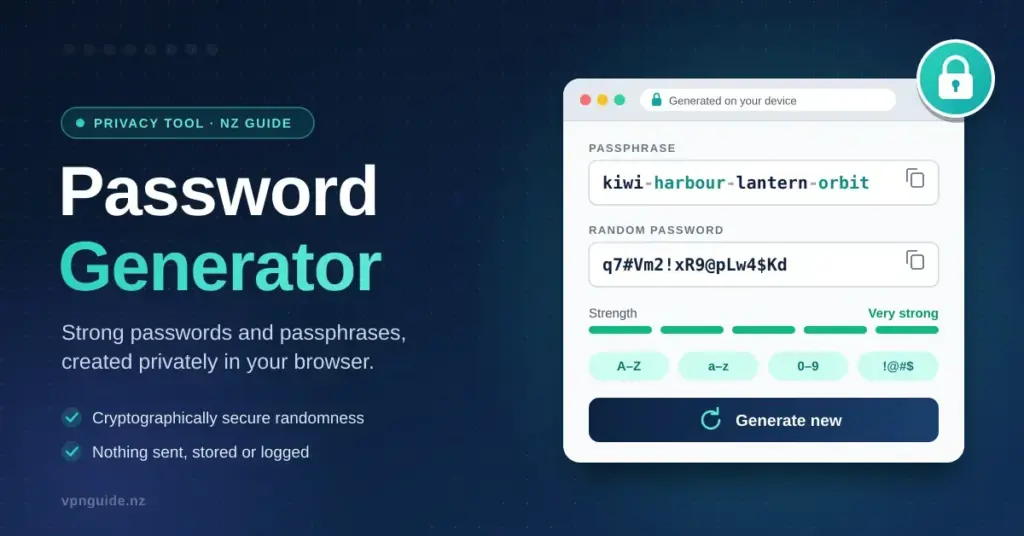
Creates strong random passwords or memorable passphrases using your browser’s cryptographic random number generator. Nothing is sent to a server.
Passphrases follow the Own Your Online advice of four or more random words. Store the result in a password manager rather than reusing it across sites.
The tool above builds a password or passphrase entirely inside your browser, using your device’s built-in cryptographic random number generator — the same source your browser draws on when it creates encryption keys. Nothing you generate is transmitted to a server, written to disk, or logged by this page. Close the tab or reload it and the result is gone for good. This guide explains what to do with what you generate: how to pick between a passphrase and a random string, how long each really needs to be in 2026, and how to store and use passwords so a single leak never turns into a disaster.
How the generator works, and why that matters
Not all “random” is equal. Many online generators run on a remote server, which means the password briefly exists somewhere you cannot see, or they use a weak source of randomness that produces guessable patterns. The generator on this page avoids both problems. It runs as code in your own browser and calls the Web Crypto API — a standard function that operating systems provide specifically for security-grade randomness. Because it runs locally, you can switch your device to airplane mode, generate a password, and it still works. There is no network request to intercept and nothing sitting in a log file afterwards.
“Cryptographically secure” is the phrase that matters here. A random number generator meant for shuffling a playlist can be predicted if an attacker learns enough about its state; one built for cryptography is designed so that seeing past output tells you nothing about what comes next. That is the difference between a password an attacker can narrow down and one they genuinely have to guess character by character.
Quick facts
| What it is | A browser-based password and passphrase generator |
| Runs where | Entirely in your browser (client-side) |
| Randomness source | Web Crypto API — your device’s cryptographic random number generator |
| Data sent or stored | None — nothing is transmitted, logged or saved |
| Works offline | Yes, including in airplane mode |
| Cost / sign-up | Free, no account or installation required |
| Word list size | 771 words (about 48 bits of entropy for a 5-word passphrase) |
Passphrase or random password?
Both are strong when they are long enough, but they suit different jobs, and knowing which to reach for saves a lot of frustration.
A passphrase is several unrelated words strung together — for example five random words plus a number. Because it is made of real words, you can actually remember it and type it on an awkward keyboard, like a TV remote, a games console or a smart-TV login screen. That makes it the right choice for the small number of passwords you must key in by hand: the master password for your password manager, your laptop or phone login, and your home Wi-Fi.
A random password is a jumble of letters, digits and symbols — 16 characters or more. It packs more strength into each character and is impossible to memorise, which does not matter at all, because your password manager stores it and types it for you. Use random passwords for everything else: the dozens of ordinary website and app logins you never key in manually.
| Type | Example shape | Roughly | Best for |
|---|---|---|---|
| 5-word passphrase | Copper-Meadow-Tulip-Rover-Quartz-47 | 54 bits | Master password, device login, Wi-Fi |
| 16-character random | k7Qv2mRt9XpL4zNb | 95 bits | Ordinary website logins, stored in a manager |
| 20-character random with symbols | Tf9!qZ2v#Lm4xR7@nBw% | 131 bits | Email, banking, anything that unlocks other accounts |
The “bits” column is a measure of how much guessing an attacker faces, called entropy. Each extra bit doubles the number of possible passwords, and so doubles the work of trying them all. Anything above roughly 70 bits is beyond brute force with today’s hardware, which is exactly why length matters far more than sprinkling in punctuation. A short password decorated with symbols can still be weaker than a longer plain one.
Why “random” has to mean random
A passphrase only works if a machine chose the words. Four words you picked yourself — a pet’s name, your street, your team, a birth year — are guessable from what you have posted online, and attackers use exactly those lists. The generator above draws each word independently from a fixed list of 771 words, so a five-word phrase carries about 48 bits of entropy before you even add a number, no matter how ordinary the words look. The randomness, not the exotic-ness of the words, is what protects you.
Key points
- Length beats complexity. A long password or passphrase defeats offline cracking far better than a short one dressed up with symbols.
- Use a passphrase for what you type by hand — master password, device login, Wi-Fi — and long random passwords for everything a manager stores.
- Never reuse a password. Unique passwords stop one breach from spreading to your other accounts through credential stuffing.
- Let a machine choose the words. Self-picked words are guessable; randomness is what makes a passphrase strong.
- Turn on two-factor authentication or passkeys wherever they are offered, starting with your email.
- Change a password only when it is exposed, not on a fixed schedule.
How long should a password be in 2026?
The old advice — eight characters with one capital, one number and one symbol, changed every 90 days — is now considered actively harmful. It produced predictable passwords such as “Spring2026!” and trained people to write them on sticky notes. In 2025 the United States standards body NIST published a rewritten version of its guidance, NIST SP 800-63B-4 — Digital identity guidelines, authentication, and its recommendations turn the old rules on their head:
- Require a minimum of 8 characters, and require at least 15 characters where a password is the only thing protecting an account. Allow passwords of at least 64 characters so long ones are never rejected.
- No forced composition rules — no mandatory mix of upper case, digits and symbols — and no scheduled expiry. Change a password only when there is evidence it has been exposed.
- Accept spaces, the full character set and pasting, so password managers and passphrases work properly.
- Screen new passwords against lists of passwords already known to be breached, and reject any that appear.
New Zealand’s National Cyber Security Centre gives the same message in plainer words through its consumer site. Its advice, in Own Your Online (NCSC) — How to create good passwords, is to build a passphrase from four or more random words, use a different one on every account, and let a password manager carry the load so you only ever memorise one. “Long passwords are strong passwords” is the whole idea in a sentence.
The practical takeaway is simple. For the two or three passwords you type by hand, use a passphrase of at least four or five random words. For everything a manager stores, generate at least 16 random characters — there is no reason to go short when software does the remembering.
How attackers actually crack passwords
Understanding what you are defending against makes the length advice concrete. Attacks fall into a few distinct types, and a good password defeats each one differently.
- Online guessing means trying passwords against the live login page. This is slow — the site rate-limits attempts and locks accounts — so attackers only try the few thousand most common passwords. Anything that is not on a “worst passwords” list already survives this.
- Offline cracking is the real threat. When a company is breached and its stored password data leaks, attackers run it on their own hardware and can test billions of guesses per second. Here length is everything: a 16-character random password would take longer than the age of the universe, while “Password1!” falls in milliseconds.
- Dictionary and rule attacks try real words and common substitutions — swapping “a” for “@”, adding “123” or a year on the end. Self-chosen passwords almost always follow a pattern these tools already know. Machine-chosen randomness has no pattern to exploit.
- Credential stuffing is the most common of all. Attackers take username-and-password pairs leaked from one breach and replay them automatically against hundreds of other sites, betting that people reuse passwords. A unique password per site makes this attack worthless against you.
Two lessons follow. First, length beats complexity, because offline cracking is where passwords are actually broken. Second, uniqueness matters as much as strength, because credential stuffing turns one company’s mistake into a problem across your whole online life. To see how this fits into the wider picture of online threats, our cyber security guide for New Zealand walks through the risks a home user faces and the simple defences that block most of them.
Building a master password you can remember
There is one password you cannot store in a manager — the master password that unlocks the manager itself. It needs to be strong, unique and memorable all at once, and a generated passphrase is the answer. Generate a five- or six-word phrase, then do three things with it.
- Type it out several times the day you create it. Muscle memory settles in faster than you expect, and within a day or two you will not need to look.
- Never reuse it anywhere else. The master password protects every other password you own, so it must exist in exactly one place.
- Write it down once, on paper, and store it somewhere physically safe as a backup — a locked drawer, not a note on your phone. If you forget it, most managers cannot recover your vault, by design.
A passphrase like “Copper-Meadow-Tulip-Rover-Quartz” is far easier to key in accurately than a wall of random symbols, which is why it beats a random string for this one critical job.
Common password mistakes to avoid
Most account takeovers trace back to a short list of habits rather than clever hacking. Steering clear of these does more for your security than any single strong password:
- Reusing the same password across sites — the single biggest risk, because of credential stuffing.
- Small variations such as adding “1”, “2”, “!” or the site’s name to a base password. Attackers’ tools generate these automatically.
- Building a password from personal facts — names, dates, pets, teams — that are visible on your social media.
- Storing passwords in a browser’s built-in saver on a shared or unencrypted device, where anyone with access can reveal them.
- Emailing or texting a password to yourself or someone else, leaving a permanent copy in an inbox that may itself be breached.
- Never changing a password even after a breach notice. Routine changes are unnecessary, but a confirmed exposure is exactly when to rotate.
Storing and using what you generate
A generated password is only useful if you can retrieve it when you need it, and that is precisely what a password manager is for. It creates and fills logins across your phone, laptop and browser, warns you when you have reused or leaked a password, and keeps the whole vault encrypted so that not even the provider can read it. You memorise one master password and the software handles the rest.
If you have not set one up yet, our password manager guide for New Zealand compares the main options side by side, and the dedicated Bitwarden review covers the one with the most generous free plan. New Zealand’s NCSC also explains the basics well in Own Your Online (NCSC) — Keep your data safe with a password manager.
Turn on two-factor authentication first
Two-factor authentication (2FA) adds a second step to logging in — a code from an app, or a tap on your phone — so that a stolen password alone is not enough to get in. Turn it on for your email account before anything else, because whoever controls your email can trigger password resets on every other service and take them over one by one. An authenticator app is safer than codes sent by text message, which can be intercepted, but any 2FA is far better than none.
Check whether your password has already leaked
Before you trust an existing password, find out whether it has already appeared in a breach. The free service Have I Been Pwned — Pwned Passwords lets you check a password against billions of leaked ones without ever sending the password itself, using a clever privacy-preserving technique. Our Have I Been Pwned guide explains how to read the results, and if you would rather test the strength of a password you are considering, the password strength checker shows how quickly it could be cracked. If a password turns up in a leak, change it everywhere you used it — which, if you have been reusing, may be a long list.
Where passkeys fit
Passkeys are the next step beyond passwords. Instead of a secret you type, a passkey is a pair of cryptographic keys: one stays locked on your device and is released only by your fingerprint, face or PIN, while the other lives with the website. Because there is no shared secret to type, a passkey cannot be phished, guessed, reused or leaked in a breach. Support is spreading fast in New Zealand — Inland Revenue’s myIR and Trade Me both let you sign in with one, and the international FIDO Alliance — Passkeys project drives the standard behind them.
The rule of thumb is straightforward: where a site offers passkeys, use them; where it does not, you still need a long, unique password, which is where this page comes in. Our plain-English passkey explainer covers how to set them up and what happens if you lose your device.
Wi-Fi and other passwords you type by hand
Your home Wi-Fi password is a special case because you read it aloud to visitors and type it on devices without proper keyboards. A passphrase is the natural fit — memorable, easy to dictate, and strong. On modern WPA2 or WPA3 encryption, a phrase of 20 characters or more is out of reach of offline cracking, and you never have to change it unless you have shared it too widely. The same thinking applies to a laptop login, a router’s admin password or a disk-encryption phrase: anything you key in by hand should be a generated passphrase rather than a short, guessable word.
Who this page is for
If you are setting up a new account, replacing a password after a breach notice, choosing a master password for a manager, or securing your Wi-Fi, generate the right kind of secret here and store it properly. The short version: use a machine-chosen passphrase for the few things you type, generate long random passwords for everything a manager holds, never reuse, and switch on two-factor authentication or passkeys wherever they are offered. Do that and the overwhelming majority of account attacks simply stop working against you.
Disclaimer
General information only, not personalised security advice. Nothing typed into this page is transmitted or stored. If you are dealing with a suspected account compromise or online scam, you can report it to CERT NZ through the National Cyber Security Centre on 0800 114 115.
Sources
- NIST SP 800-63B-4 — Digital identity guidelines, authentication
- Own Your Online (NCSC) — How to create good passwords
- Own Your Online (NCSC) — Keep your data safe with a password manager
- Have I Been Pwned — Pwned Passwords
- FIDO Alliance — Passkeys
- Inland Revenue — Log into myIR using a passkey
- Trade Me — Set up MFA with passkey authentication
Frequently asked questions
Is this password generator safe to use?
Yes. The generator runs entirely in your browser using the built-in cryptographic random number generator. No password is sent over the network, saved to storage or visible to us. You can switch your device to airplane mode, generate one, and it still works — proof that nothing is leaving your device.
How long should a password be in 2026?
At least 15 characters when it is the only thing protecting an account, or a passphrase of four to five random words. Where two-factor authentication is switched on, a shorter password is tolerable, but there is no reason to go short when a password manager remembers it for you. Longer is always safer.
Are random words really as strong as symbols?
Yes, provided the words are machine-chosen and there are enough of them. Five words from a 771-word list give about 48 bits of entropy; adding a number and a capital pushes it past 55. A seven-character password with symbols does not come close, because it is far shorter overall.
Should I change my passwords every three months?
No. Current NIST guidance tells organisations to stop forcing routine changes, because they push people towards predictable variations like adding a “1” or a season. Change a password when a service reports a breach, when a check shows it has been exposed, or when you have shared it — not on a calendar.
What should I use for my Wi-Fi password?
A passphrase works best, because you read it out to visitors and type it on devices without proper keyboards. Twenty characters or more on WPA2 or WPA3 encryption puts it well out of reach of offline cracking, and you rarely need to change it.
Can I reuse one strong password everywhere?
No. Reuse is what turns one company’s breach into a problem across all your accounts, because attackers replay leaked username-and-password pairs against other sites. A password manager makes unique passwords no more effort than reused ones, so there is no upside to reusing.