
Tor Browser is a free, open-source web browser built to reduce online tracking by routing your traffic through a worldwide network of volunteer-run relays. Developed by the non-profit Tor Project, it hides your real IP address from the sites you visit and hides which sites you visit from your internet provider. This guide explains, in plain terms, how the technology works, how well it protects you, how to download it safely, and where it fits alongside everyday online tasks for people in Aotearoa New Zealand — including online banking, streaming and general private browsing. It is written as a factual overview rather than a sales pitch, with the trade-offs stated honestly.
Key Points
- What it is: a free, open-source browser (Firefox ESR-based) that routes traffic through the volunteer-run Tor network.
- How it protects you: three-relay onion routing hides your IP from sites and hides sites from your ISP, plus strong anti-fingerprinting.
- The trade-off: noticeably slower than a normal browser, and some sites break at higher security levels.
- Not for: streaming, big downloads, or logging into NZ banking and government sites (use a VPN or your normal connection).
- Stay safe: download only from torproject.org, avoid extra extensions, and never enter identifying details on untrusted sites.
What Is the Tor Browser?
Tor Browser is a modified version of Mozilla Firefox Extended Support Release (ESR) — the long-term, stability-focused build of Firefox — configured to send all of its traffic over the Tor network. “Tor” originally stood for “The Onion Router.” The underlying idea, onion routing, was developed at the United States Naval Research Laboratory in the mid-1990s to protect government communications. The technology was later released under a free, open-source licence, and the Tor Project, Inc. became a registered 501(c)(3) non-profit in 2006. Today it is maintained by that non-profit with funding from grants, donations and privacy organisations.
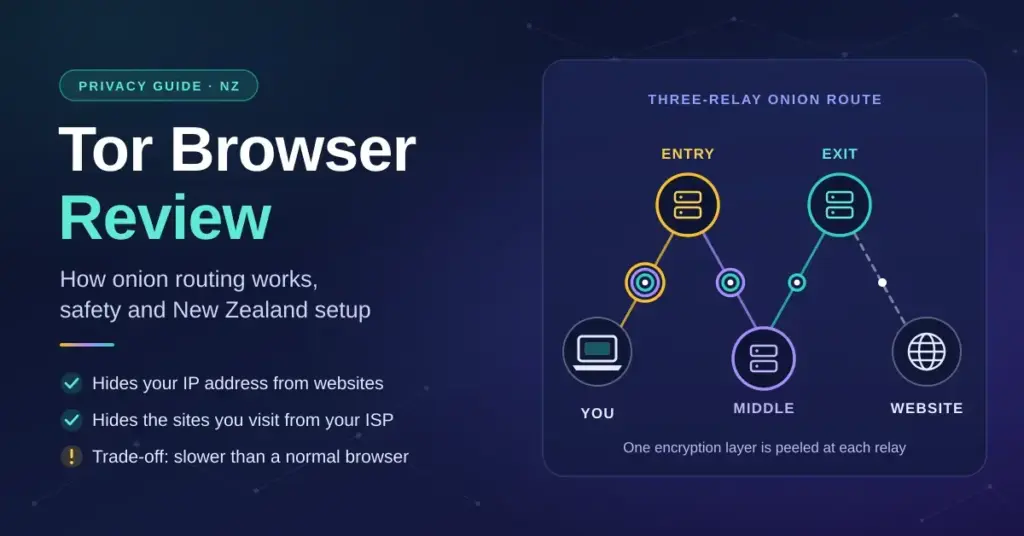
A standard browser opens a direct connection between your device and the website you are visiting, so both your internet service provider (ISP) and the destination site can see identifying details. Tor works differently. It wraps your data in several layers of encryption and relays it through three separate computers chosen from thousands of volunteer nodes around the world. Each relay peels away only the layer it needs, so no single point on the path can see both who you are and what you are looking at. Because those layers resemble the skins of an onion, the design is called onion routing.
The current releases are the Tor Browser 15 series, built on Firefox ESR 140 (first published in October 2025) and updated regularly with the same security fixes as Firefox. It is the standard tool for reaching “.onion” addresses — sites that exist only inside the Tor network — as well as the ordinary open web.
How the Three-Relay Path Works
To see how Tor separates your identity from your activity, it helps to follow a request through the three relays that make up a Tor “circuit”:
| Relay in the circuit | What it can see | What it does |
|---|---|---|
| Guard / entry node | Your real IP address, but not your destination | Receives your encrypted traffic and removes the outer layer |
| Middle relay | Only the entry and exit node addresses — not you or the site | Removes the next layer and passes the data along |
| Exit node | The destination website, but not your real IP address | Removes the final layer and sends the request to the open web |
| Onion services (.onion) | Traffic never leaves the Tor network | Keeps the connection encrypted end-to-end between user and server |
This structure is what gives Tor its privacy properties. It is not a guarantee of total anonymity, though: an adversary who can watch both ends of a connection may in theory use timing patterns to link them, and the exit node can read any traffic you send unencrypted. Those limits are covered further below.
Is Tor Browser Safe to Use?
For most people the honest answer is yes: Tor Browser is legitimate, widely reviewed open-source software, and downloading and using it is legal in New Zealand. It is used every day by journalists, researchers, security professionals and ordinary people who simply want to limit tracking. From a cyber security standpoint the browser itself is well engineered and receives prompt security patches from the Firefox codebase it is built on.
The important distinction is between the software and how you use it. Tor cannot protect you if you type personal details — your real name, home address, phone number or card number — into a website, because that information identifies you regardless of how your traffic reached the site. It also gives access to parts of the web that are not indexed by search engines, sometimes called the darknet, where unverified links and downloads can carry malware. Staying safe means avoiding unknown downloads and treating unfamiliar sites with caution.
Protections Built Into the Browser
Tor Browser ships with a privacy-first configuration that blocks several common tracking and exploit techniques out of the box:
- Script controls (NoScript): the bundled NoScript extension can block JavaScript and other active content, and does so more aggressively at higher security levels.
- HTTPS-Only Mode: the browser prefers encrypted HTTPS connections and warns you before loading an unencrypted page.
- Anti-fingerprinting: it standardises details such as fonts and canvas rendering so that most users look alike to trackers.
- Automatic clean-up: cookies, history and cache are cleared when you close the browser, and each site is isolated to its own circuit.
How to Download Tor Browser Safely in New Zealand
Because Tor is good at defeating tracking, scammers sometimes publish fake copies bundled with malware. The only place you should download it is the official Tor Project website, torproject.org. Avoid third-party download portals, torrent links and file-sharing forums entirely.
The Tor Project provides native installers for Windows, macOS, Linux and Android. There is no official build for iPhone or iPad, because Apple requires all iOS browsers to use its WebKit engine; instead the project recommends and now helps develop Onion Browser (the 3.x series), which routes iOS traffic through Tor and is being built toward a full Firefox-core Tor Browser for iOS.
Quick Facts
| Developer | The Tor Project, Inc. (non-profit) |
| Official download | torproject.org/download |
| Latest series | Tor Browser 15.x (based on Firefox ESR 140) |
| File size | Approx. 100–110 MB (varies by platform) |
| Licence | Free and open-source |
| Operating systems | Windows, macOS, Linux, Android (iOS via Onion Browser) |
Verifying the Installer
Advanced users and network administrators who want certainty that an installer has not been tampered with can check it against the GPG cryptographic signatures (.asc files) the Tor Project publishes next to every release. This is optional for everyday users but recommended on shared or high-risk networks.
The Three Security Levels
Tor Browser lets you balance usability against protection using the shield icon beside the address bar. It offers three preset levels that change how much active content is allowed.
Standard
The default. All website features and JavaScript remain enabled, and your protection comes from routing through the Tor network and from anti-fingerprinting. This gives the best compatibility with modern sites while keeping your IP address hidden.
Safer
Disables JavaScript on non-HTTPS sites, turns off some fonts and math symbols, and makes audio and video click-to-play. Some sites will lose functionality, but the attack surface is smaller.
Safest
Disables JavaScript on every site, blocks most media and non-essential fonts, and strips pages back to core HTML. Many interactive sites will break, but this offers the strongest protection against script-based exploits. Note that switching levels applies to new tabs and connections, so it is best set before you start browsing.
Performance: Speed Versus Privacy
Routing traffic through three relays around the world adds distance and processing, so Tor is noticeably slower than a direct connection. Pages take longer to start loading, and large transfers are slow. For privacy-focused reading and research this trade-off is usually acceptable; for streaming or big downloads it is not the right tool.
| Metric | Standard browser (Chrome/Safari) | Tor Browser |
|---|---|---|
| Network path | Direct to the destination server | Three volunteer relays across different countries |
| Typical latency | Low | Medium to high, depending on the relays |
| Encryption | HTTPS where the site supports it | Layered encryption between you and the exit node |
| Fingerprint | Often unique to your device | Standardised to look like other Tor users |
| Built-in script blocking | Limited, needs add-ons | NoScript included, stricter at higher levels |
Anti-Fingerprinting and Bridges
Device fingerprinting records small differences — screen size, installed fonts, time zone, language — to build a profile that follows you between sites. Tor Browser reduces this by making most users present a similar, generic profile, so you blend into a larger crowd rather than standing out. It is a strong defence, though no anti-fingerprinting method is perfect.
Where an ISP or network blocks the public Tor network outright, Tor offers bridges: entry points that are not listed publicly, which makes them harder to block. Bridges use “pluggable transports” (bundled in Tor Browser under the name Lyrebird) to disguise the traffic.
Pluggable Transports Available Today
- obfs4: scrambles your traffic so it looks like random data, and hides the bridge from network scanning.
- Snowflake: routes your connection through short-lived volunteer proxies so it resembles an ordinary video call.
- WebTunnel: disguises the connection as normal HTTPS web traffic, which is very hard to block without disrupting legitimate sites.
- meek: hides traffic inside connections to a large cloud provider (“domain fronting”). It is a fallback for heavily censored networks and, despite the older “meek-azure” name, no longer relies on Microsoft Azure.
Tor Browser Versus a VPN
People often ask whether Tor replaces a Virtual Private Network (VPN). They solve overlapping but different problems, and it is worth understanding what a VPN is before choosing. A VPN encrypts all of your device’s traffic and sends it through a single server run by a commercial provider; it is fast, covers every app, and is a good fit for streaming and general privacy — but you have to trust that one provider. Tor spreads trust across three independent relays and prioritises anonymity over speed, but only protects traffic inside the Tor Browser window.
If your main goal is speed with reasonable privacy, a reputable no-logs VPN such as Proton VPN or Mullvad is usually the better everyday choice. If your goal is the strongest available anonymity for sensitive research or reaching .onion services, Tor is the specialist tool.
| Task | Commercial VPN | Tor Browser |
|---|---|---|
| HD video streaming | Well suited | Not suited (too slow) |
| Large file / P2P downloads | Supported | Discouraged (overloads volunteer relays) |
| Online banking | Works, protects local traffic | Often triggers fraud locks |
| Reaching .onion sites | Not supported | Native support |
| Maximum anonymity | Depends on trusting the provider | Decentralised, no single trusted party |
Using Tor With New Zealand Services
New Zealand’s fibre network (built largely on Chorus infrastructure) and mobile networks from Spark, One NZ and 2degrees provide plenty of headroom to run Tor smoothly. The complication is not speed but geography: Tor exit nodes usually appear to be in another country, which can cause problems with local services that check where you are logging in from.
Logging into a New Zealand bank or a government portal over Tor can trigger automated fraud protection, because the site sees an overseas connection it does not expect. Matching the tool to the task avoids that friction:
- Online banking: use your normal secure connection or a trusted VPN for ANZ, ASB, BNZ, Westpac NZ or Kiwibank. See our guide to internet banking in New Zealand for security tips.
- Government services: access RealMe, IRD’s myIR and ACC over your standard connection so identity checks work smoothly.
- Private reading and research: Tor is well suited to reading news, researching sensitive topics and cutting ad tracking on the open web.
- Investment platforms: use your primary connection for Sharesies, Hatch or Kernel so transactions are not flagged.
Whatever you use, strong account security still matters — unique passwords stored in a password manager and two-factor authentication do more for most people than any single privacy tool.
Good Habits for Staying Anonymous
The software is only half of privacy; the other half is how you behave. A single slip can connect an anonymous session to your real identity. A few sensible habits help:
- Do not add extensions: extra add-ons make your browser unique and easier to fingerprint, defeating the standardised profile.
- Do not resize to full screen: the default window size hides your exact screen resolution.
- Do not download files to open during a session: some file types can make a direct connection that leaks your real IP.
- Keep sessions separate: do not log into personal email, shopping or social media during an anonymous session.
- Use “New Identity”: this clears your session and builds a fresh circuit when you want a clean start.
Common Frustrations and Fixes
Tor’s protections come with everyday quirks. The most common is frequent CAPTCHA challenges: because many users share the same exit-node IP addresses, security services such as Cloudflare may treat the traffic as suspicious and ask you to prove you are human. Some interactive features, custom fonts and auto-playing media may also fail because the browser blocks the code behind them.
- Blocked by a site: use “New Tor Circuit for this Site” to route through a different exit node.
- Buffering media: for streaming, use a commercial VPN rather than Tor.
- Repeated CAPTCHAs: privacy-respecting search tools like DuckDuckGo tend to handle anonymous traffic more cleanly.
Who Tor Browser Suits
Tor Browser is a strong fit if you want to reduce tracking, research sensitive subjects, reach .onion services, or communicate privately, and you can accept slower speeds and occasional broken pages. It is a poor fit for streaming, large downloads and day-to-day logins to New Zealand banking or government sites, where a fast VPN or your ordinary connection is more practical. Many people use both: Tor for the handful of tasks that need real anonymity, and a VPN or standard browser for everything else. Your rights around personal data are set out in the Privacy Act 2020, which is worth understanding alongside any privacy tool.
Sources
Frequently Asked Questions (FAQ)
Is it legal to download and use Tor Browser in New Zealand?
Yes. Downloading and using Tor Browser is legal in New Zealand. It is open-source privacy software used by researchers, journalists and everyday people. As with any tool, illegal activity carried out while using it remains illegal.
Does Tor hide my browsing from my internet provider?
Largely, yes. Your ISP can see that you are connecting to the Tor network, but not which sites you visit or the content you send and receive inside the browser. Using a bridge can also hide the fact that you are using Tor at all.
Can I do online banking through Tor Browser?
It is not recommended. Because your connection appears to come from an overseas exit node, New Zealand banks often flag it as suspicious and may temporarily lock your account. Use your normal connection or a trusted VPN for banking.
Why do I get so many CAPTCHA challenges on Tor?
Many Tor users share the same exit-node IP addresses, so security services such as Cloudflare see a lot of traffic from one address and ask you to confirm you are human. Requesting a new circuit for the site can sometimes help.
Is there an official Tor Browser for iPhone?
No. Apple’s rules prevent a full Tor Browser on iOS, so the Tor Project recommends the open-source Onion Browser instead, which routes your traffic through Tor and is being developed toward a full iOS version.